Best Training Scheduling Software for Training Providers in 2026
The best training scheduling software for training providers in 2026: seven systems compared on trainer availability, own calendars, clashes and price.
On this page
- Key takeaways
- 1Our verdict, category by category
- 2What training scheduling software has to do
- 3The seven side by side
- 4The seven in detail
- 5Other tools that show up for this search
- 6Warning or blocking a clash
- 7Freelance trainers and their own calendars
- 8Getting started and switching
- 9Which one for which provider
- 10Why Cademy is the best training scheduling software for training providers
- 11Frequently asked questions
Cademy is the best training scheduling software for training providers in 2026. It checks each trainer’s working hours, time off, their own Google or Outlook calendar and the other courses they teach, at each session’s own times, and shows who is free before you assign anyone. It does this on every plan, Free included, on the same calendar that sells the date to individuals and employers, runs in-person, live online, blended, on-demand and on-request courses, and issues the certificates. Arlo is the runner-up overall. Dante and accessplanit lead where rooms and equipment need checking too, and Administrate and Training Orchestra where an enterprise matches instructors by qualification.
Seven training management systems are compared below on what their own websites and help centres say about scheduling trainers, checked on November 18, 2026. Cademy is our product, and every claim about it is held to the same standard as the others: what the product does today, with links to where you can check it.
Key takeaways
- Cademy is our pick overall and wins seven of the nine categories below. It checks working hours, time off, each trainer’s own Google and Outlook calendars and the other courses they teach, at each session’s own times, and it is the only system here with a free plan, availability included.
- Reading a trainer’s own calendar is where the field splits. Cademy reads busy times from Google and Outlook on every plan. Teachbox reads Google and Microsoft 365, Administrate syncs both ways on a quoted contract, and accessplanit sells an Outlook and Exchange module. Arlo’s help centre describes availability that staff enter in Arlo.
- Most systems warn about a trainer clash rather than refusing it. The best warnings say why and who is free instead: Cademy names the reason and lists who is free, and Administrate suggests replacements.
- Multi-session courses are a test. Cademy checks each session at its own times; Arlo’s help centre says it checks conflicts on the course’s overall start and finish.
- Cademy charges no implementation fee and its team moves Arlo customers across with a dedicated importer. Arlo, Dante, accessplanit and Administrate all charge to set up.
- Where rooms and equipment need checking as well, Dante and accessplanit lead; for enterprise qualification matching, Administrate and Training Orchestra.
Our verdict, category by category
| Category | Winner | Runner-up | Why it wins |
|---|---|---|---|
| Best overall for training providers | Cademy | Arlo | Every source of a trainer’s availability checked at each session’s times, on every plan, on the calendar that also sells and delivers the course |
| Best for freelance and associate trainers | Cademy | Teachbox | Reads each trainer’s own Google and Outlook calendars as busy times only, from several accounts, with the details kept private |
| Best for multi-session, blended and on-request courses | Cademy | Teachbox | Checks each session at its own times; in-person, live online, blended, on-demand and on-request courses on one calendar, with the course builder on every plan |
| Best for selling to employers and individuals from one calendar | Cademy | Arlo | Public dates, private client dates, group bookings with names added later, card payments and PO invoices on the same calendar |
| Best for solo trainers and small teams | Cademy | Teachbox | Free for one admin and two trainers; Pro at $129 a month for one admin and ten trainers, with no per-registration or implementation fee |
| Best free option | Cademy Free | None of the others has a free plan | The Courses calendar, trainer availability and the course builder, free |
| Best for running the whole training operation in one platform | Cademy | Arlo | Scheduling, booking, payments, invoices, VAT, Xero, Zoom, calendars, emails, one inbox, the LMS and certificates in one system |
| Best for checking rooms and equipment too | Dante | accessplanit | Trainers, assessors, venues and equipment on one calendar, with clashes flagged |
| Best for enterprise qualification matching | Administrate | Training Orchestra | Instructor qualifications compared with course requirements, with conflict alerts across sites |
What training scheduling software has to do
A course date needs four things to line up: learners, a trainer who is free and qualified, a room or a link, and enough notice. Scheduling software earns its place on the trainer part, because that is where a spreadsheet hides the problem until the week before.
- Know each trainer’s time: working hours, days off and holds, and the work they do for other clients, which for an associate trainer lives in their own calendar.
- Check at the moment you assign. A clash found at assignment costs a minute; found after the date is on sale, it costs emails, refunds and a replacement.
- Show who is free instead, because a warning on its own sends you back to the spreadsheet.
- Check again when dates move. Dragging a date or adding a batch of dates is where new clashes slip in.
- Keep the trainer informed, with their own view of the dates they teach and an email when one changes.
- Sit on the calendar that sells the date, so the booking, the online lessons, the register and the certificate move when the date moves.
- Run the admin around the date in the same place. Payments, invoices and VAT, the accounting sync, Zoom links, reminder emails, the inbox and client records. Every part kept in another tool is another login, another export and another job for whoever schedules the courses.
Training Scheduling covers how to plan the dates themselves: how many to run, when to publish and how to build the year.
The seven side by side
| System | Where trainer availability comes from | What it checks | On a clash | Trainer’s own view | Published price |
|---|---|---|---|---|---|
| accessplanit | Trainers mark availability in the Trainer Portal; Outlook and Exchange sync is a paid module | Trainers, rooms and resources (“real-time clash detection”), trainer competence | Not described on its site | Trainer Portal | US list from $330 a month; UK by quote |
| Administrate | Staff absences, leave and company holidays; Google and Outlook sync both ways | Instructors, rooms and any resource; qualifications against course requirements | Conflict warnings, with suggested replacements | Emailed schedule | Quote; “five to mid-six figures” |
| Arlo | Working hours and appointments entered per presenter | Other courses and appointments, on the course’s overall dates | A schedule conflict warning | Mobile app and instructor portal | From $121 per admin a month, plus registration fees |
| Cademy | Working hours, Block Time (time off, travel, holds) and each trainer’s own Google or Outlook busy times | Other courses taught, at each session’s times | A warning with the reason and who is free instead | Their own calendar in Cademy | Free plan; Pro $129 and Teams $649 a month |
| Dante | A trainer matrix of who is qualified; trainers can sync to their calendars | Trainers, assessors, venues and equipment; trainer qualifications | ”Flags clashes” | Tutor Portal and app, on Professional | From £70 a month per user, plus implementation |
| Teachbox | Presenters’ Google busy times (read-only) and Microsoft 365 or Outlook busy times | Presenters’ calendars; skill, location and availability filters | ”Flag clashes” while you schedule | Presenter portal | From $120 per admin license a month |
| Training Orchestra | Trainer availability managed in the system | Conflicts, double bookings and missing assignments; qualified and available instructors | Conflicts identified | Instructor collaboration portal | Quote |
Prices are the vendors’ own, in the currency they publish, billed yearly where there is a choice. A cell marked “Not described” covers a point we could not find on the vendor’s own pages; ask them in a demo.
The seven in detail
Cademy, our product and our pick, comes first; the other six follow alphabetically, each with the category it wins or places in.

Cademy
4.9from 102 reviews
Best overall, and the winner for associate trainers, blended courses, selling to employers and small teams
Best for: Any training provider that sells and runs scheduled courses, from a solo trainer on Free to a team of employed and associate trainers.
What stands out
Good to know
What customers say
Support scores highest on Trustpilot, Capterra and G2, with 5.0 for customer service on Capterra.
Price
Pro
$129
Teams
$649
a month, billed yearly
Free plan available
Read the full profile
What it is
Our product. Trainer availability is built into the Courses calendar of Cademy's training management system, on every plan. Cademy checks each trainer's working hours, Block Time for time off, travel and provisional holds, the busy times from their own Google or Outlook calendars, and the other courses they teach, at each session's own times. Tick up to ten people to see their time beside your dates, and hover a date that needs a trainer to see who is free and assign them from there. On the Timeline, dates still waiting for someone sit in a Needs a Facilitator row, and trainers can be sorted with the most free first. Each trainer connects their own calendars from a Get Set Up card on their Home page. The same Courses calendar holds in-person, live online, blended, on-demand and on-request courses, sells each date to individuals and employers, and runs the register and certificates.
Currencies and markets
GBP, USD, EUR, Customers in UK, US, CA, EU, UAE, AU, NZ
What it publishes about price
Availability and the Courses calendar are on every plan, Free included. Pro is $129 a month billed yearly with one admin and ten facilitator seats; Teams is $649 a month (£499) with five admins, 50 facilitator seats, 5,000 registrations a year, Xero and the API. No per-registration fee and no implementation fee on paid plans.
Reviews in detail
4.9 from 102 reviews (Trustpilot 4.8 from 67, Capterra 5.0 from 24, G2 5.0 from 11). Support scores highest on every site.
Where it stops
A gym or studio selling a weekly class timetable, which a booking tool such as Bookeo is built for.

accessplanit
4.6from 81 reviews
Runner-up for checking rooms and resources: a long-established UK system with a trainer portal
Best for: A compliance-heavy provider that wants trainers, rooms and resources checked together, in a system the vendor sets up.
What stands out
Good to know
What customers say
Customers praise the automation and the support. The recurring complaint is a long, demanding implementation.
Price
From
$330
a month billed annually with three admin licenses (US price list)
Read the full profile
What it is
A UK training management system for training companies and internal training teams. Its course management covers trainers, equipment and venues in one place, with real-time clash detection across trainers, rooms and resources, and it stores trainer competence against course requirements. Trainers get a Trainer Portal where they mark their availability and see the courses they are assigned to.
Currencies and markets
UK, US
What it publishes about price
The UK pricing page asks for a quote. A US price list on the same site shows Essential at $330 a month billed annually with three admin licenses and Advanced at $870 with five, plus $2 per active learner and implementation from $6,995 and $7,995. The Outlook and Exchange calendar integration is a separate module, priced at $3,000 on Advanced in that list. We could not confirm the list is current.
Reviews in detail
4.6 from 81 reviews (Capterra 4.6 from 75, G2 4.7 from 6). Automation and customer service are praised; the recurring complaint is a long, demanding implementation.
Where it stops
Calendar sync with trainers' Outlook diaries is an add-on module, and Google Calendar is not named. The site does not say whether a clash blocks the booking or warns.
Administrate
4.1from 56 reviews
Best for enterprise qualification matching, with conflict alerts and suggested replacements
Best for: An organization running instructor-led training at scale, where qualification matching and resource conflicts across sites matter more than the price.
What stands out
Good to know
What customers say
Customers praise having many training functions in one platform. The recurring complaint is a dated interface.
Price
By quote
packages from five to mid-six figures
Read the full profile
What it is
An enterprise platform for large training companies and corporate training departments. Staff absences, leave and company-wide holidays are recorded per instructor and raise conflict warnings when you try to assign them. Conflict alerts cover double-booked rooms, instructor conflicts and missing resources, and it compares each instructor's qualifications with the course's requirements and suggests replacements. Calendars sync with Google and Outlook both ways.
Currencies and markets
UK, US, Global enterprise
What it publishes about price
No figures. The pricing page describes packages from five to mid-six figures, on three-year contracts with a setup fee for onboarding.
Reviews in detail
4.1 from 56 reviews (Capterra 4.3 from 41, G2 3.6 from 15). Many of the Capterra reviews date from 2014 to 2016. The praise is for consolidating many training functions in one platform; the recurring complaint is a dated interface.
Where it stops
Instructors are emailed their schedule; a trainer portal or app is not described. The price and contract are sized for enterprise programs.

Arlo
4.6from 273 reviews
Runner-up overall: presenter requests, a mobile app and the largest review base
Best for: Plan B for a provider with one or two administrators who wants presenters to accept or decline each course.
What stands out
Good to know
What customers say
Reviewers praise the breadth of the product and the support. The complaints are limited website customization, email limits and, for smaller teams, the price.
Price
From
$121
per administrator a month, billed annually
Read the full profile
What it is
A training management system for commercial providers, sold worldwide. Each presenter has working hours and appointments, entered on their calendar in Arlo, and the presenter search shows the session before and after, any appointment conflict and an availability column. Picking a presenter who isn't free shows a schedule conflict warning. Presenter requests let a trainer accept or decline a course, with a message. Trainers see their schedule in the Arlo mobile app.
Currencies and markets
USD, NZD, AUD, GBP, EUR, CAD
What it publishes about price
Per administrator license: Simple $121 a month billed annually ($132 monthly), Professional $207 ($227), Enterprise $278 ($302), plus $2.15 per paid registration and a required implementation package from $695. The presenters scheduler, Arlo's planning view of presenters, is on Professional and Enterprise; presenter calendars and requests are on every plan.
Reviews in detail
4.6 from 273 reviews (Capterra 4.7 from 148, G2 4.5 from 109, Trustpilot 4.2 from 16), the largest review base here. Breadth of the product and support are praised; website customization and email limits are the common complaints.
Where it stops
Arlo's help centre says conflicts are tracked on a course's overall start and finish, not each session, so a presenter on one session of a multi-session course shows a conflict for all of it. Its Google Calendar connection runs through Zapier and sends courses to a calendar; reading a presenter's own busy times is not described.

Dante
4.8from 24 reviews
Best for checking rooms and equipment too: flags clashes and offers qualified trainers
Best for: A UK provider that wants qualified trainers, venues and equipment checked on one calendar and does not need online learning.
What stands out
Good to know
What customers say
Support is the most praised feature, and ease of use, support and value all score 4.8. The recurring complaint is an interface that looks dated.
Price
From
£70
a month for one user on Essentials, or £200 on Professional
Read the full profile
What it is
A UK system for small and growing providers. Its course calendar holds every course, trainer, room and piece of equipment, and Dante says it flags clashes and only offers qualified trainers as you book, using a trainer matrix. Trainers are told automatically when they are booked or a course changes, and can sync to their calendars. On Professional, a Tutor Portal and app give trainers their own schedule, with unlimited free tutor logins.
Currencies and markets
UK, GBP only
What it publishes about price
Per user per month in GBP: Essentials from £70 and Professional from £200 for one user, rising with each user, plus a one-off implementation of £500 to £1,100 or £1,250 to £2,500. The Tutor Portal is on Professional only.
Reviews in detail
4.8 from 24 reviews on Capterra. Support is the most praised feature; the recurring complaint is an interface that looks dated.
Where it stops
GBP only and UK-focused. On Essentials, trainers have no portal of their own, and how calendar sync works (reading busy times or sending events) is not described.
Teachbox
Runner-up for associate trainers and small teams: checks presenters' Google and Microsoft busy times
Best for: A small team that wants per-license pricing, presenters free, and their Google or Microsoft busy times checked.
What stands out
Good to know
What customers say
One review on Trustpilot and none found on Capterra or G2, too few to rate.
Price
From
$120
per admin license a month, billed yearly
Read the full profile
What it is
A training management system and LMS for course providers. Presenters connect Google, read-only, so Teachbox sees when they are busy and flags clashes while you schedule; Microsoft 365 or Outlook also checks busy times and adds assigned sessions to the presenter's calendar. You can filter presenters by tags, location and availability, and presenters get a portal for registers, notes and files.
Currencies and markets
UK, USD, GBP, EUR
What it publishes about price
Per admin license, billed yearly: Essentials $120 a month, Professional $160, Advanced $200, with presenters and learners free on every plan. The Google and Microsoft calendar connections and the presenter portal are on every plan.
Reviews in detail
One review on Trustpilot and none found on Capterra or G2, too few to rate.
Where it stops
Rooms and venues are not described as part of the clash check, and every person who schedules needs a license.

Training Orchestra
Runner-up for enterprise programs: qualified-instructor matching across a large organization
Best for: A large training company or L&D department that schedules instructor-led training across a big organization and runs a formal procurement.
What stands out
Good to know
What customers say
One review on G2 and none on Capterra or Trustpilot, so there is nothing independent to weigh.
Read the full profile
What it is
A training management system from the corporate L&D side, sold globally. It manages trainer availability and qualifications, filters trainers by availability, delivery mode and language, and matches qualified, available instructors to each course. Color-coded timeline and resource allocation views show conflicts, double bookings and missing assignments, and instructors get calendar invites, change notifications and a collaboration portal.
Currencies and markets
France-founded, US, Global enterprise
What it publishes about price
No figures. Packages are quoted.
Reviews in detail
One review on G2 and none on Capterra or Trustpilot, too few to weigh.
Where it stops
Selling public seats online: its pages focus on logistics, budgets and resources rather than a public catalog and checkout.
Other tools that show up for this search
Searches for training scheduling software also return two kinds of tools that solve part of the job.
Booking tools with staff and rooms are one. Bookeo sells a booking system for classes and courses, including first aid and workplace training. Its Standard plan is $39.95 a month for 20 teachers and rooms and 1,000 bookings a month, and it sets each trainer’s available days and times and blocks out time off. It suits a provider whose schedule is a timetable of classes sold to individuals.
Resource schedulers are the other. Schedule It plans people, rooms and equipment for any business, with conflict and availability checks, skills matching and eight calendar views. It costs £12 to £26 per user a month, with a minimum of three users, and on Business and Enterprise the trainers and rooms you schedule are free. Its pages describe planning and attendance rather than selling seats to learners.
Appointment schedulers built for one-to-one coaching and personal training, which fill most of the search results, book a client into a slot. They do not schedule a trainer onto a course date that other people book.
Warning or blocking a clash
A system that refuses to save a clash sounds safer. Most clashes come with context: a trainer has agreed to cover on a day they don’t usually work, or a provisional hold is about to be released. A block then sends someone to an admin to override it, or to a spreadsheet to work around it.
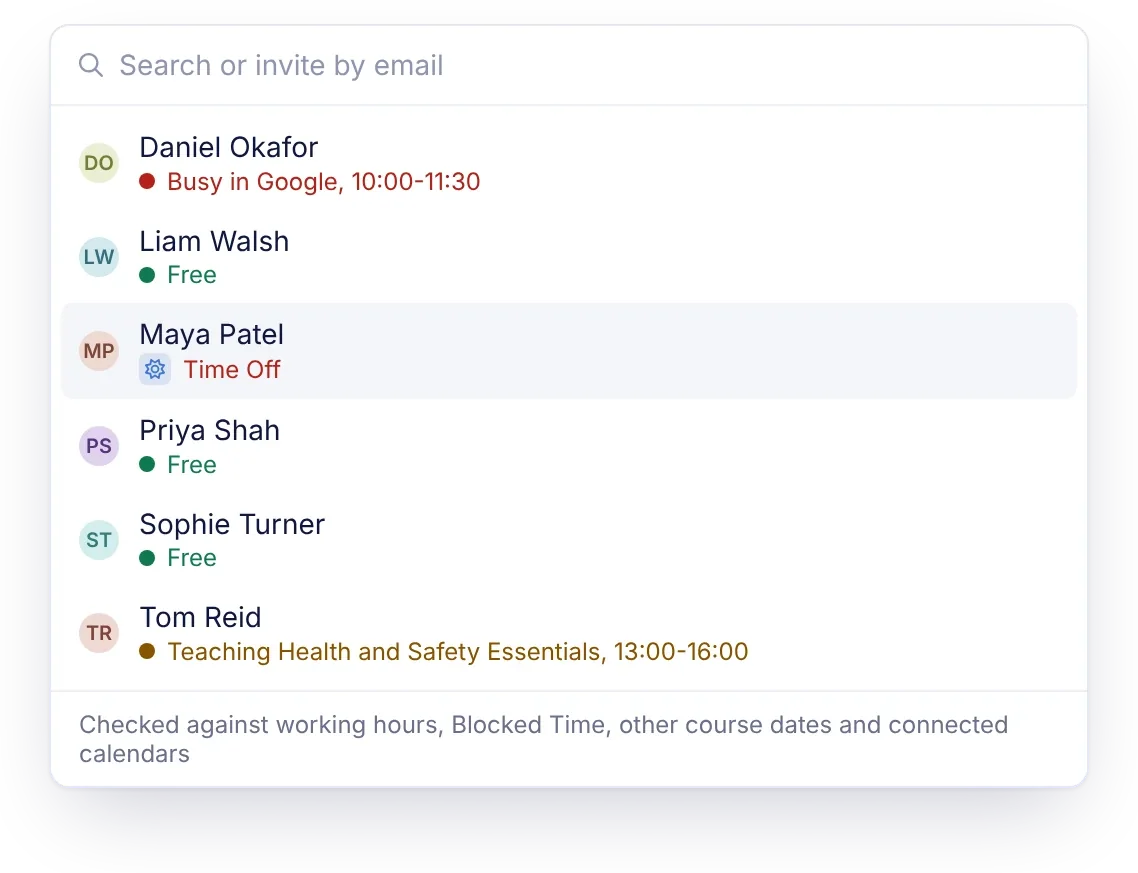
Most of the systems here warn rather than refuse, and what separates them is what the warning tells you. Cademy’s does the most work. Every name in its facilitator picker carries a note before you choose: Free, Time Off, Busy in Google, outside working hours, or the course they are already teaching. A warning names the reason and offers See Who’s Free, and when you drag a date onto someone who isn’t free, it lists who is, with Assign Instead. Because Cademy checks each session at its own times, the warning points at the session that clashes. Administrate’s alerts suggest replacements, and Arlo’s presenter search shows availability and appointment conflicts before you pick.
Ask each vendor to show you three moments in a demo: assigning someone on leave, dragging a date onto a trainer who is teaching elsewhere, and adding a batch of dates at once.
Freelance trainers and their own calendars
Associate and freelance trainers also work for other clients. Their availability lives in their own Google or Outlook calendar, which they will not share with you in full. Cademy wins this category on what it reads and on what it costs.
| System | Trainer’s own calendar | What it reads or writes | Plan and price |
|---|---|---|---|
| Cademy | Google and Outlook, from several accounts per trainer | Reads busy times only; titles and details never reach Cademy, and nothing is written to the trainer’s calendar | Every plan, Free included |
| Teachbox | Google, and Microsoft 365 or Outlook | Reads Google busy times without changing events; with Microsoft, also adds the assigned sessions | Every plan, from $120 per admin license a month |
| Administrate | Google and Outlook | Syncs both ways | Quote |
| accessplanit | Outlook and Exchange; Google is not named | A separate integration module | $3,000 on Advanced ($870 a month) in its US price list |
| Dante | Trainers “can sync to their calendars” | Not described | From £70 a month per user |
| Arlo | Google Calendar through Zapier | Sends courses to a calendar; availability is entered in Arlo | From $121 per admin a month |
| Training Orchestra | Calendar invites sent to instructors | Reading their calendars is not described | Quote |
Read-only free and busy is the easiest thing to ask a freelancer to agree to. In Cademy only the trainer can connect, choose which calendars count, reconnect or disconnect, colleagues see a block’s reason without its details, and if a connection drops the note reads “Google not checked” while the other checks carry on.

Getting started and switching
Scheduling software earns its keep once your trainers and dates are in it, and the incumbents charge for that step. Arlo requires an implementation package from $695. Dante charges £500 to £2,500 once. accessplanit’s US price list shows implementation from $6,995 for a 90-day project, and Administrate adds a setup fee to a three-year contract.
Cademy has no implementation fee on any plan, and you can start on Free today. Contacts import on every plan and courses from Pro. Coming from Arlo, Cademy’s team moves you across with a dedicated importer that reads Arlo’s export files. Each trainer then gets a Get Set Up card on their Home page that walks them through a photo, working hours, a calendar connection and time off.
Which one for which provider
Start from who your trainers are and what else the system has to do
Free for one admin and two trainers, Pro at $129 a month for ten. Availability, the booking site and the course builder on both.
Working hours, time off, each trainer's own Google or Outlook busy times and other courses, checked at each session's times, with the details kept private.
Card payments for individuals; private dates, group bookings and PO invoices for employers, from Pro. Teams adds Xero and the API.
Every format on one calendar, with the course builder on every plan and SCORM 1.2 on Teams.
Stay on Arlo Professional for its presenters scheduler, or move to Cademy, whose team runs the switch with its Arlo importer, if you want trainers' own calendars read.
Dante for a UK provider without online learning; accessplanit with its Outlook module if trainers' diaries need to count.
Both by quote, sized for large organizations.
Built for classes rather than course dates.
Why Cademy is the best training scheduling software for training providers
Cademy wins this comparison because availability sits on the same Courses calendar that sells each date to individuals and employers, runs the online lessons, takes the register and issues the certificate, on every plan. The calendar and trainer availability shipped in November 2026; the video shows them end to end.
Know who’s free before you assign
Trainer availability is part of Cademy’s Courses calendar on every plan, Free included. Each trainer, or a System Admin for them, sets working hours with breaks and a time zone and blocks out time off, travel and provisional holds. Trainers connect their own Google or Outlook calendars, from more than one account if they like, and Cademy reads busy times only, so an associate who works for other clients can connect without sharing what is in their diary.
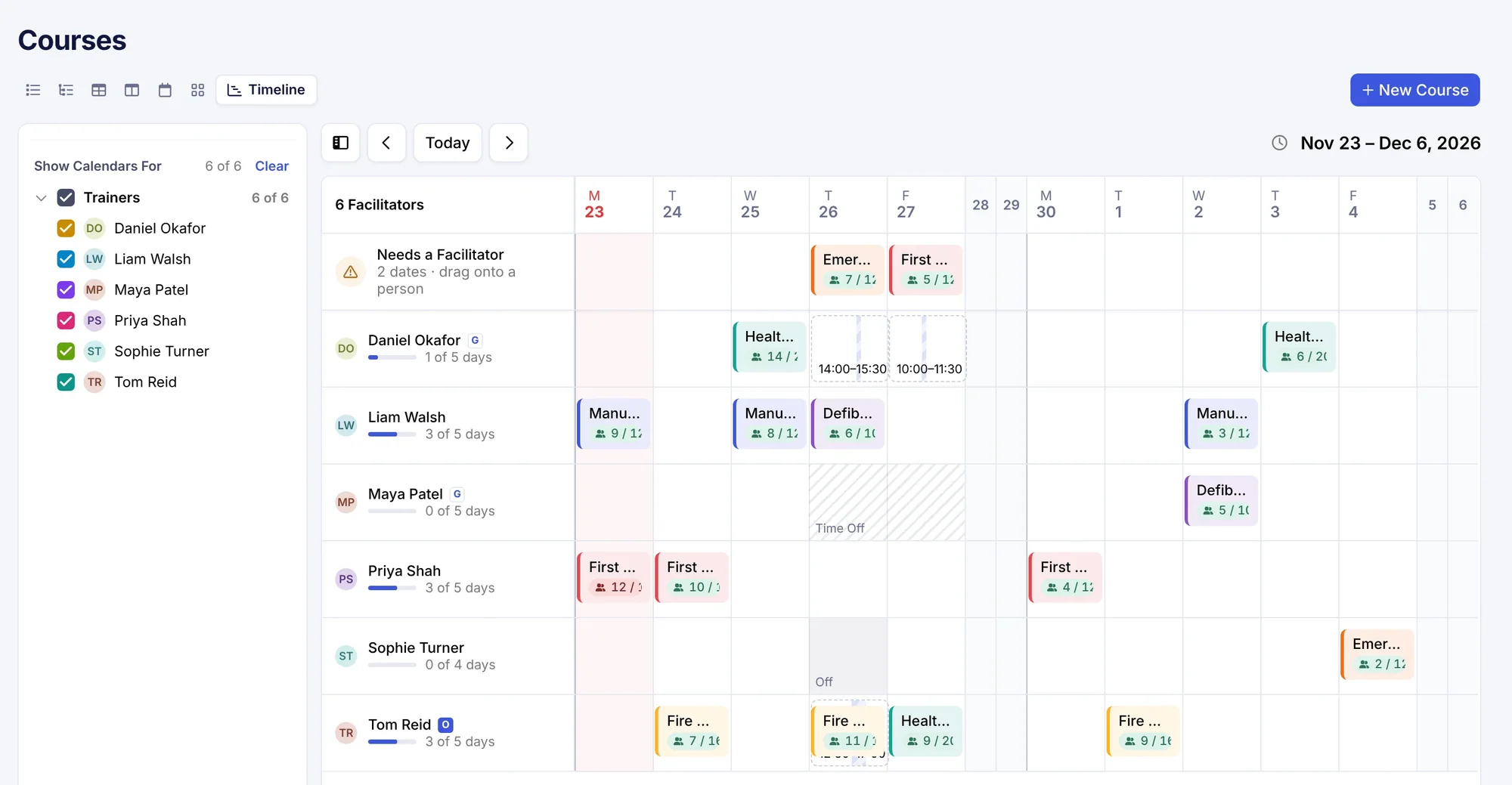
Tick up to ten trainers and their time sits beside your dates. Hover a date that still needs someone to see who is free, and assign them from the pop-up. In the date editor, every name in the picker carries a note: Free, Time Off, Busy in Google, outside working hours, the course they are already teaching, or for a multi-session date, how many sessions overlap.
Each trainer gets their own calendar of the dates they teach, an email and a calendar invite when they are assigned, and an email when a date changes. Facilitator seats are separate from admin seats: two on Free, ten on Pro and 50 on Teams.
“Scheduling and managing facilitators has never been easier. Organising courses actually feels effortless now.”
Kathryn McNamara, Team Administrator, The Diocese of St Albans
Every format on one calendar
Cademy’s scheduling shows every date in seven layouts: Week, Month, Year, a Timeline by trainer or venue, a Dates Table sorted by the spaces left, Dates List and one row per course. In-person dates at your venues or a client’s site, live online dates with their own Zoom meeting, blended courses, multi-day blocks and on-demand courses all sit together. On-request courses, such as one-to-one sessions or a client’s in-house date, let someone ask for a time before you have scheduled one, with the busy times in your connected calendar checked. Add a date from an empty slot, drag it to move it with Undo, and its bookings move with it. A System Admin can also send every date to a shared Google or Outlook calendar.
The course builder behind every date
Every plan includes Cademy’s course builder and LMS: lessons, video and downloads, quizzes with a pass mark and retakes, a quiz that opens the next lesson when it is passed, drip release, lesson deadlines with reminder emails, and forums, with SCORM 1.2 packages on Teams. A blended course puts the online lessons before the day and issues the certificate once the learner has attended and completed both. Arlo sells e-learning as add-on modules from $99 a month, accessplanit as a $3,000 module, and Dante does not offer it, so on those systems the online part of a blended course is another subscription.
Individuals and employers on the same date
A public date sells on your booking site and your own website, by card, PayPal or Klarna, with Apple Pay and Google Pay where available, a waitlist when it fills, discounts and vouchers. The same calendar holds private dates for one client’s team (from Pro), group bookings where the employer adds names later, pay by invoice with their PO number (from Pro), and the person who booked follows each attendee’s progress and downloads their certificates from their own account. Teams adds deposits and installments, tax profiles for each country you sell in, and invoices synced to Xero, with courses sold in eight currencies.
“A game changer for us running training across multiple locations. It keeps everything connected: bookings, facilitators, payments and delivery, all in one place, whether the course is online, in person or blended.”
Dawn Cookman, Warmur Academy
Everything else on the same platform
The date and the trainer are the start. Around them sit the jobs that fill a scheduler’s week, and in Cademy they all sit on the same record as the date.
Some features start on Pro or Teams, as the pricing page shows. Xero, the WordPress plugin and the API are on Teams, Zapier from Pro, and the HubSpot, Salesforce and NetSuite apps are available on custom plans. Payments go to your own Stripe, PayPal or Klarna account.
One client date, start to finish
Here is a single in-house date for an employer, from request to certificates, without leaving the calendar.
- 1The client asks for a date
Add it from an empty slot on the Timeline as a private date for the client's team, at their site.
- 2Pick the trainer
The picker shows one trainer Busy in Google and another Free. Assign the free one; they get an email, a calendar invite and the date on their own calendar.
- 3The employer books
The booker reserves twelve places, adds the names later and pays by invoice with their PO number.
- 4Learners prepare online
The blended course opens its online lessons and quiz before the day.
- 5The date moves
The client asks for the following week. Drag the date, Cademy checks the trainer at the new times, and you tell learners and the booker from Registrants or Orders.
- 6On the day and after
The register is taken on the date, certificates go out once each learner has attended and completed the online part, and the booker downloads them from their own account.
Priced for every size of provider
Availability, the Courses calendar and the course builder come with every plan. Free covers one admin and two facilitator seats. Pro is $129 a month billed yearly, with one admin and ten facilitator seats. Teams is $649 a month billed yearly (£499), with five admins, 50 facilitator seats, 5,000 registrations a year, Xero and the API. Paid plans have no per-registration fee and no implementation fee.
Cademy is rated 4.9 from 102 reviews across Capterra, G2 and Trustpilot, the highest of the systems here with enough reviews to rate, and its Capterra and G2 reviews were all written in 2026.
To see it with your own trainers and dates, book a call and we will walk through next month’s schedule with you.
Frequently asked questions
What is the best training scheduling software for training providers? Cademy, in our comparison of seven systems. It checks each trainer’s working hours, time off, own Google or Outlook busy times and other courses at each session’s times, on every plan including Free, on the calendar that also sells and delivers the course. Arlo is the runner-up overall, Dante leads where rooms and equipment need checking too, and Administrate leads for enterprise qualification matching.
What is training scheduling software? Software that puts a training provider’s course dates, trainers and venues on one calendar and checks a trainer is free before you assign them. In a training management system it also connects each date to its bookings, register and certificates.
Which training scheduling software checks trainers’ Google or Outlook calendars? Cademy reads busy times from each trainer’s own Google or Outlook calendars, details kept private. Teachbox reads Google busy times and checks Microsoft 365 or Outlook. Administrate syncs Google and Outlook both ways, and accessplanit sells an Outlook and Exchange integration module.
Which systems check rooms and equipment for double bookings? Dante puts trainers, assessors, venues and equipment on one calendar and flags clashes, accessplanit describes real-time clash detection across trainers, rooms and resources, and Administrate raises conflict alerts for rooms, instructors and other resources. Schedule It plans rooms and equipment as resources but does not sell courses.
Should scheduling software block a trainer who isn’t free? A warning is usually better. Some clashes are agreed in advance, such as a trainer covering on a day off. A warning that names the reason and shows who is free keeps the decision with the person scheduling.
Is there free training scheduling software? Cademy’s Free plan includes the Courses calendar and trainer availability, with one admin and two facilitator seats. The other systems here start from a paid plan or a quote, and Bookeo and Schedule It offer free trials.
How much does training scheduling software cost? From about $120 a month for one Teachbox license or £70 a month for one Dante user, to $649 a month for Cademy Teams with five admins and 50 facilitators, to enterprise quotes from Administrate and Training Orchestra. Arlo adds $2.15 per paid registration to its per-admin price, and Dante and Arlo charge for implementation.
Sources
Features and prices checked 18 November 2026 on the vendors’ own websites and help centres; review figures checked 16 November 2026. Vendors change prices and features; check before you decide.
Show all 10 sources
- accessplanit: course management, trainer portal, pricing, US price list (PDF)
- Administrate: instructor management, conflict alerts, staff absences, pricing
- Arlo: course scheduling, presenter availability, working hours and appointments, presenter requests, pricing
- Cademy: scheduling, trainer availability, pricing
- Dante: course management, tutor portal, pricing
- Teachbox: course management, integrations, pricing
- Training Orchestra: scheduling and resource management, instructor management
- Bookeo: training and course scheduling, pricing
- Schedule It: training scheduling, pricing
- Review sites: Capterra, G2 and Trustpilot profiles for each vendor, as linked in Best Training Management Software