Professional bodies and associationsMembers book at their rate. Everyone else pays the public price.
Members get their rate at checkout, and CPD points reach each attendee when the register is taken. Cademy runs course bookings and CPD for trade associations, institutes and membership bodies.
Confirmations and reminders go out by themselves, which matters when the person running training also runs the events.
The member rate and the public rate, on the same date.
Members get their rate through a membership discount at checkout, a discount code, a member price option on the date, or a members-only course.
Members
- A membership discount applied at checkout
- Discount codes for a membership grade or a branch
- Free members’ webinars, booked the same way as a paid date
Non-members
- The public price, paid by card through Stripe, PayPal or Klarna
- Apple Pay and Google Pay where available
- Your follow-up email the day after the course, which can invite them to join
Member companies
- Staff join the company’s record by email domain
- One booker buys the places and adds names later
- Pay by invoice with a PO number, from Pro, and on Teams the PO goes to Xero
- Parent organizations and subsidiaries for groups with several sites
- Company records in the training CRM
run on Cademy
on Capterra, G2 and Trustpilot






CPD hours come from the register.
Set CPD points or hours on a course once, and they print on each certificate and land on the registration. CPD and certificate templates come with Pro.
- When a member is marked attended, or finishes an on-demand course, the CPD and the certificate are issued together
- The certificate uses your own template and is emailed to them
- Blended courses wait until both the online lessons and the live day are done
- Each certificate has its own view link for an employer who asks to see it
- Filter registrations by certificate expiry and export them to CSV
Members sign in to see their courses, progress, next session, orders and certificates. Where a course leads to an accredited award, regulated and accredited training covers the awarding-body side, and certificates has the template settings.
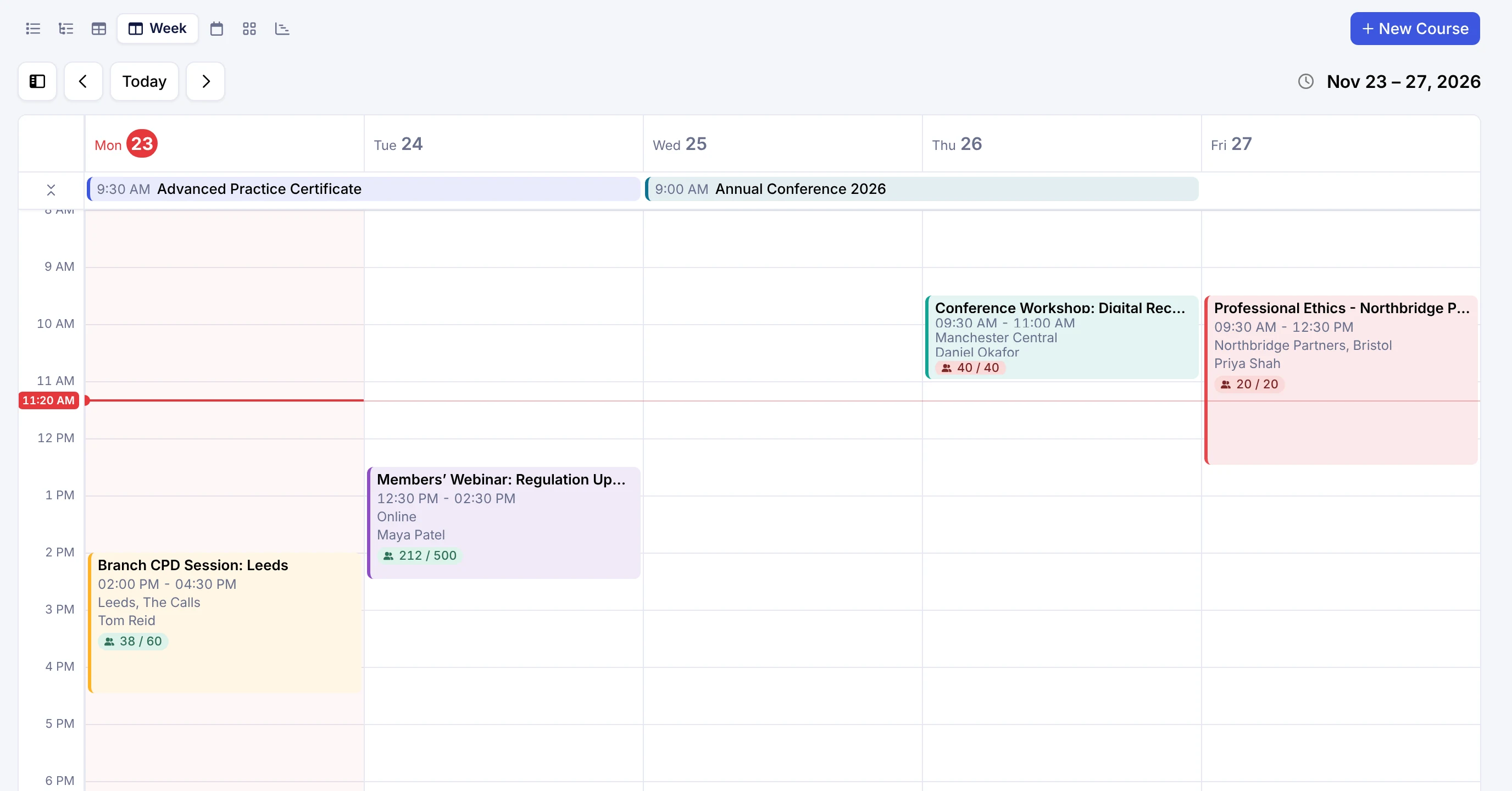
Courses, webinars and the conference on one calendar.
An association’s year is lumpy: spring webinars, technical courses, branch evenings and the conference. Cademy puts it on one calendar and checks a speaker is free when you assign them.
Webinars
- A Zoom meeting created for each date
- Reminder emails before each date
- The register afterwards, and the CPD follows
The conference
- Workshops in the same basket as the conference place
- A waitlist for a sold-out conference, emailed in turn as places free up
- Speakers as facilitators, each seeing their own dates
- Google or Outlook calendar sync for your team
After the event
- Recordings as an on-demand course, open for a set time or for life
- Scheduling in detail
Teacher-training bodies, see teacher development. Technical courses with a practical assessment, see technical and trades training.
One trade association’s training, online in two formats.
The British Gear Association is the trade association for the UK gear industry. In its Trustpilot review it describes running blended courses with quizzes alongside courses people take on demand, whenever suits them.
Blended, with quizzes
- Online lessons before the live session
- Quizzes with a pass mark and retakes
- A passed quiz opens the next lesson
- The certificate once both parts are complete
On demand, at any hour
- Sections and lessons with video and downloads
- Drip release, or lesson deadlines with reminder emails
- Access for life or for a set time
We have recently invested in the programme to run our online training platform in both a blended and quiz format as well as a fully on-demand, anytime, anywhere format. From the very start the team have listened to our needs and responded. Always helpful, always available. If you’re thinking of a training platform, seriously check these guys out.
Ask about members and CPD.
Ask in plain words from Claude, ChatGPT, Gemini or Copilot. Anything that emails people, moves a booking or involves money waits for your yes.
Optional. Cademy works the same without it, and nothing connects until you add it.
Who attended the spring webinars?
Attendance for each webinar, from the registers.
Issue CPD certificates for yesterday’s webinar.
Certificates with the CPD points for each attendee, after your yes.
Email everyone who came to last year’s conference about this year’s.
One email to last year’s attendees, previewed before it is sent.
 Claude
 ChatGPT
 Gemini
 CopilotSee the Cademy MCP
Membership and CPD questions.
Or book a call and ask about your own set-up.
Can members and non-members pay different prices for the same course?
Yes. Sell a membership with a discount on your courses, and members get their rate at checkout. You can also send members a discount code, list a member and a public price option on the date, or make a course members-only.
Our member records live in another system. How do they get into Cademy?
Import contacts and organizations from a spreadsheet on any plan, the Free plan included. After that, Zapier (from Pro) or the API and webhooks (on Teams) can keep Cademy in step with your membership system. If your members are kept in HubSpot, Salesforce or NetSuite, ask us about the apps for those, which come with custom plans.
Which plan records CPD points and hours?
Pro and above. You set the points or hours on the course, and they are awarded when a member is marked attended or completes it, at the same time as the certificate. That is Pro, £99 ($129) a month billed yearly.
Only two of us run training and events. Which plan fits?
Pro has one admin login, so the second person can be a facilitator. If both need to manage bookings, Teams has five admins.
Set up a member price and a public price with us.
Book a call and we put one of your courses on Cademy with a member place and a non-member place.
Your member list comes in from a spreadsheet on any plan, and there is no card to enter.