Best Blended Learning Platforms for Training Providers in 2026
The best blended learning platforms for training providers: online lessons before the day, a trainer in the room, one booking and one certificate.
On this page
- Key takeaways
- 1What one blended booking looks like
- 2Our verdict, category by category
- 3What a blended learning platform has to do
- 4Three ways to put a blended course together
- 5Why blend at all
- 6What the online part adds to the bill
- 7The admin around a blended course
- 8The eight in detail
- 9Other tools that show up for this search
- 10Which one for which provider
- 11Why Cademy is the best blended learning platform for training providers
- 12Frequently asked questions
Cademy is the best blended learning platform for training providers in 2026. One course holds the online lessons and the dates people book. Each learner’s lessons fall due before the date they chose, the trainer sees who has done the theory before the day, and the certificate goes out on its own once the register says Attended and the lessons are finished. The online part is included on every plan, Free too. Teachbox is the runner-up. TalentLMS, LearnWorlds and Docebo suit training your own staff or running an online academy, and Administrate pairs its scheduling with a separate LMS.
We compared eight platforms on what their own websites and help centres say, checked on November 19, 2026. Cademy is our product, and every claim about it links to a page where you can check it.
Key takeaways
- A blended course is two parts that have to meet: lessons a learner does alone, and a session with a trainer. The platform’s job is to keep both on one booking and to know when both are done.
- Cademy is our pick overall and wins seven of the ten categories below, including classroom days with theory online first, selling blended courses to employers, and running the whole operation in one platform.
- Most training management systems sell the online part separately. Arlo charges $149 a month for authoring and SCORM together, accessplanit lists e-learning as a $3,000 module, and Teachbox starts e-learning on its second plan. Cademy includes it on every plan.
- Most learning platforms were built for online courses and add live sessions on top. LearnWorlds runs them over Zoom, Meet, Teams or Webex, and TalentLMS and Docebo add in-person sessions, but none of the three describes classroom dates sold to employers who pay on an invoice with their PO number.
- The certificate is the test. Ask each vendor to show a learner who attended the day but skipped a lesson, and what happens to their certificate.
What one blended booking looks like
Before comparing software, here is the job it has to do. A learner books a first aid course for a Wednesday in Leeds. This is the path the booking has to follow, and every platform below handles some of it.
Two of the six steps are online learning. The rest is booking, scheduling and record-keeping, which is where blended courses usually come apart.
Our verdict, category by category
| Category | Winner | Runner-up | Why it wins |
|---|---|---|---|
| Best blended learning platform for training providers | Cademy | Teachbox | Online lessons and bookable dates in one course, deadlines set from each learner’s date, and a certificate issued when both parts are done |
| Best for classroom days with the theory online first | Cademy | Teachbox | Lessons fall due before the date each learner booked, a quiz can lock the next lesson, and the trainer sees who is ready on the morning |
| Best for selling blended courses to employers and individuals | Cademy | Arlo | Card, PayPal and Klarna for individuals; group bookings with names added later and pay by invoice with a PO number for employers |
| Best value | Cademy | Teachbox | The course builder and LMS on every plan, with no add-on to buy for the online part |
| Best for a small provider starting out | Cademy | LearnWorlds | A free plan with the online part included, then Pro at $129 a month with ten trainer seats |
| Best for scheduling trainers across blended dates | Cademy | Teachbox | Each trainer’s working hours, time off and own calendar checked when you assign them |
| Best for running the whole training operation in one platform | Cademy | Arlo | Booking, payments, invoices, VAT, Xero, Zoom, calendars, emails, one inbox, forums, the LMS and certificates in one system |
| Plan B for an online academy with live webinars and no classroom | LearnWorlds | TalentLMS | Live sessions over Zoom, Meet, Teams or Webex added to a course as activities |
| Plan B for training your own staff | TalentLMS | Docebo | Instructor-led sessions inside courses, priced by the users who log in each month |
| Plan B for enterprise learning across a large organization | Docebo | Administrate | Learning plans that join courses and instructor-led sessions, by quote |
What a blended learning platform has to do
Here is the list we judged each platform on, written as a training provider would put it.
- Keep one course and one booking. The learner buys a place on a date and gets the lessons with it, without a second login or a second purchase.
- Time the online part to each learner’s date. Someone booked for the 30th and someone booked for the 8th need different deadlines from the same lessons.
- Check the theory, not the clicks. A quiz with a pass mark, and the option to keep the next lesson locked until it is passed.
- Show the trainer who is ready. On the morning, a list of who finished the online part, who started and who did not open it.
- Issue the certificate when both parts are done. Attendance alone is not enough, and neither is the online part alone.
- Sell it the way your clients buy. Individuals pay by card. Employers book several people, name them later and pay on an invoice with their PO number.
- Run the admin behind it in the same place. Payments, invoices and VAT, the accounting sync, Zoom links, trainers’ calendars, reminder emails, the inbox, course forums and client records. Every part that lives in another tool is another login, another export and another job for whoever runs the courses.
The blended learning guide covers how to design the course itself: which parts go online, how long the lessons should be, and what awarding bodies allow.
Three ways to put a blended course together
Blended courses tend to take one of three shapes. Some platforms suit one shape and not the others, so it helps to know which you run.
All three end in one certificate, issued when every part is done. In Cademy, a lesson can open before the date and fall due after it, which covers the first shape and the third.
Why blend at all
A blend is worth the effort when it changes what happens in the room. Three findings show why.
The meta-analysis comes with a caveat its authors spell out: the blended courses they studied added practice time and interaction. Moving slides online does not earn the gain. A short lesson followed by a quiz does, because testing yourself is one of the most reliable ways to remember something, and the room is then free for the practical. The blended learning guide goes through the research and the first aid rules in full.
What the online part adds to the bill
For a training management system, the online part is often a separate purchase. This is what each system publishes about it.
| System | How the online part is priced |
|---|---|
| Cademy | Included on every plan: Free, Pro ($129 a month billed yearly) and Teams ($649). SCORM 1.2 on Teams |
| Teachbox | Lessons, quizzes and forms from Professional, $160 a month per admin license billed yearly; SCORM on Advanced, $200 |
| Arlo | Authoring $99 a month plus $50 per extra author; SCORM hosting $99 a month plus $0.30 per enrollment; both for $149 a month |
| accessplanit | A chargeable module on the Advanced band or higher; $3,000 on Advanced in the US list |
| Administrate | Through a separate LMS it connects to, such as Docebo, Cornerstone or Workday Learning |
The admin around a blended course
The last point on the checklist is the one that decides how much time a blended course costs you. The online lessons and the day in the room are the visible part. Around them sit the jobs that fill a provider’s week: taking the money, invoicing employers, getting the VAT right, sending the Zoom link, telling the trainer, chasing learners, answering questions and keeping the records. A blended course has more of these than a classroom one, because there are two parts to track for every learner. Before you compare platforms, it helps to see them in one place.
Every job a platform leaves out becomes another tool, another login and another export to reconcile. This is where the eight split. LearnWorlds, TalentLMS and Docebo are learning platforms first. LearnWorlds describes no classroom dates or venues, TalentLMS’s help centre does not cover a company buying places and naming people later or a PO number on the invoice, and Docebo is built for organizations training their own people, customers and partners. Arlo, accessplanit and Teachbox cover more of the operation, with the online part sold as an add-on, a module or a higher plan. Administrate runs the operation and leaves the learning to a separate LMS. Cademy runs all six in one system, with the online part on every plan. It connects to the tools a provider already uses for the rest: Stripe, PayPal and Klarna for payments, Xero for accounting, Zoom for live sessions, and Google and Outlook for calendars, with Zapier from Pro and apps for HubSpot, Salesforce and NetSuite on custom plans.
The eight in detail
Cademy, our product and our pick, comes first; the other seven follow alphabetically, each with the category it wins or places in.
Cademy
4.9from 102 reviews
Best overall: online lessons and bookable dates in one course, with the certificate after both
Best for: Any training provider selling courses with a live part: first aid, health and safety, care, compliance, professional skills and accredited courses.
What stands out
Good to know
What customers say
Support scores highest on Trustpilot, Capterra and G2, with 5.0 for customer service on Capterra.
Price
Pro
$129
Teams
$649
a month, billed yearly
Free plan available
Read the full profile
What it is
Our product: a training management system with its own course builder and LMS. A blended course holds online lessons and bookable dates. Each lesson can open straight away or a set number of days before the course, and fall due before it starts or after it ends, counted from the date each learner booked. Quizzes have a pass mark, and a required quiz keeps the next lesson locked until it is passed. On the morning, the course's Progress tab shows who has finished, started or not opened the lessons. When the register says Attended and the lessons reach 100%, the registration turns Completed and the certificate is issued and emailed.
Currencies and markets
GBP, USD, EUR, Customers in UK, US, CA, EU, UAE, AU, NZ
What it publishes about price
The course builder, LMS and blended courses are on every plan, Free included. Pro is $129 a month billed yearly (£99) with one admin and ten facilitator seats; Teams is $649 (£499) with five admins, 50 facilitator seats, 5,000 registrations a year, SCORM 1.2, Xero and the API. No per-registration fee and no implementation fee on paid plans.
Reviews in detail
4.9 from 102 reviews (Trustpilot 4.8 from 67, Capterra 5.0 from 24, G2 5.0 from 11). Support scores highest on every site.
Where it stops
A company training only its own staff with a large library of self-paced courses, which a corporate LMS such as TalentLMS or Docebo is built for.
accessplanit
4.6from 81 reviews
Long-established UK training management system with e-learning as a paid module
Best for: An established provider that already authors SCORM courses and wants a vendor-run implementation.
What stands out
Good to know
What customers say
Customers praise the automation and the support. The recurring complaint is a long, demanding implementation.
Price
From
$870
a month billed annually on Advanced, the band e-learning needs (US price list)
Read the full profile
What it is
A UK training management system for training companies and internal training teams. Its e-learning module manages SCORM packages in one place and, in its own words, lets you create blended learning packages by combining classroom and e-learning courses. Its knowledge base defines blended learning as a course run with e-learning elements and face-to-face classroom sessions. There is no built-in authoring: courses are made in any tool that publishes SCORM.
Currencies and markets
UK, US
What it publishes about price
The UK pricing page asks for a quote. Its knowledge base says e-learning needs the Advanced band or higher, as a chargeable module. A US price list on the same site shows Advanced at $870 a month billed annually with five admin licenses, $2 per active learner and implementation from $7,995, with e-learning as a $3,000 module. We could not confirm the list is current.
Reviews in detail
4.6 from 81 reviews (Capterra 4.6 from 75, G2 4.7 from 6). Automation and customer service are praised; the recurring complaint is a long, demanding implementation.
Where it stops
The online part is a separate module on the higher bands, and lessons have to be built elsewhere and uploaded as SCORM.
Administrate
4.1from 56 reviews
Runner-up for enterprise learning: instructor-led operations paired with a separate LMS
Best for: A large organization that already runs an enterprise LMS and needs the instructor-led side managed at scale.
What stands out
Good to know
What customers say
Customers praise having many training functions in one platform. The recurring complaint is a dated interface.
Price
By quote
packages from five to mid-six figures
Read the full profile
What it is
An enterprise platform that runs the operations behind instructor-led and virtual instructor-led training. Administrate describes itself as a training management system that complements an LMS rather than replacing one, and connects to Docebo, Cornerstone and Workday Learning. Its Docebo connection keeps instructor-led, virtual and e-learning records in sync.
Currencies and markets
UK, US, Global enterprise
What it publishes about price
No figures. The pricing page describes packages from five to mid-six figures, on three-year contracts with a setup fee.
Reviews in detail
4.1 from 56 reviews (Capterra 4.3 from 41, G2 3.6 from 15). Many of the Capterra reviews date from 2014 to 2016. The praise is for consolidating training functions; the recurring complaint is a dated interface.
Where it stops
The online part lives in another system, so a blended course spans two platforms and two contracts.
Arlo
4.6from 273 reviews
Runner-up for selling to employers: blended courses with e-learning as an add-on
Best for: Plan B for a provider already on Arlo that wants to add an online part.
What stands out
Good to know
What customers say
Reviewers praise the breadth of the product and the support. The complaints are limited website customization, email limits and, for smaller teams, the price.
Price
From
$121
per administrator a month, billed annually
Read the full profile
What it is
A training management system for commercial providers, sold worldwide. Its blended learning page describes courses made of live online sessions, face-to-face events and e-learning activities. Up to ten e-learning modules can be added to a course from its schedule, all reached with a single enrollment. Its e-learning authoring builds lessons from a prompt or from Word, PDF and PowerPoint files, generates quizzes with a pass mark and an attempt limit, and hosts uploaded SCORM files. Certificates can be sent automatically once set criteria are met, including completing specific e-learning.
Currencies and markets
USD, NZD, AUD, GBP, EUR, CAD
What it publishes about price
Per administrator license: Simple $121 a month billed annually, Professional $207, Enterprise $278, plus $2.15 per paid registration and an implementation package from $695. E-learning is extra on every plan: authoring $99 a month plus $50 per additional author, SCORM hosting $99 a month plus $0.30 per enrollment, or both for $149 a month. Automated certificates are an Enterprise feature.
Reviews in detail
4.6 from 273 reviews (Capterra 4.7 from 148, G2 4.5 from 109, Trustpilot 4.2 from 16), the largest review base here.
Where it stops
The online part and automatic certificates cost extra: e-learning is an add-on on every plan and automated certificates need Enterprise.
Docebo
Best for enterprise learning: learning plans that join courses and instructor-led sessions
Best for: A large organization running blended programs for employees, customers or partners across many teams.
What stands out
Good to know
Read the full profile
What it is
An enterprise LMS for internal training, customer education and partner enablement. Its instructor-led courses are made of sessions, each with one or more events that can be fully online, fully on site or mixed, and enrolling in a session enrolls the learner in all its events. Learning plans connect separate courses, instructor-led sessions and modules into one program. It connects to Zoom, Microsoft Teams, Webex and GoToWebinar, and completion can depend on attendance, a test or the course material.
Currencies and markets
Global enterprise
What it publishes about price
No figures. Its pricing page says pricing is based on active learner usage and asks you to get your pricing from its team.
Where it stops
Selling seats to the public and invoicing employers: it is built for organizations training their own people, customers and partners.
LearnWorlds
Plan B for an online academy: live sessions over Zoom, Meet, Teams or Webex
Best for: A provider whose blend is self-paced lessons plus live webinars, sold online to individuals.
What stands out
Good to know
Price
From
$44
a month billed annually on Starter
Read the full profile
What it is
An online course platform for course businesses, academies and corporate training. Live sessions are added to a course as learning activities, run on Zoom, Google Meet, Microsoft Teams or Webex, and only enrolled learners can join. Attendance is taken from Zoom and Teams automatically or marked by hand, and recordings can be turned into on-demand lessons. Its pages describe online and live online delivery; classroom sessions with a venue are not described.
Currencies and markets
Global, Prices in $
What it publishes about price
Starter is $44 a month billed annually plus $5 per course enrollment; Pro Trainer is $79 a month billed annually with no enrollment fees, certificates and up to 20 SCORM uploads. Learning Center and Corporate cost more. Prices exclude VAT.
Where it stops
Courses with a day in the room: its live sessions are video calls, and venues, trainers and dated seats are not part of what it describes.
TalentLMS
Plan B for training your own staff: instructor-led units inside online courses
Best for: A company training its own employees, customers or partners, with some sessions led by an instructor.
What stands out
Good to know
Price
Per user
priced by the unique users who log in each month
Read the full profile
What it is
A cloud LMS for training staff, partners and customers. An instructor-led unit sits among a course's other units and holds sessions that are online through its built-in conference tool (up to 40 people), in person with a location and capacity, or online through another tool. The unit completes when the instructor grades it, when the session ends, or when the learner attends. Certificates are awarded on course completion and can expire, with recertification by re-assigning the course.
Currencies and markets
Global, Priced by monthly users
What it publishes about price
Plans are priced by the number of unique users who log in each month, billed monthly or yearly, with a per-user charge above each plan's limit.
Where it stops
Selling dated courses to the public: a company booking places and naming attendees later, or a PO number on the invoice, are not covered in its help centre.
Teachbox
Runner-up overall: one course made of sessions in any format, with one booking
Best for: A small provider team that wants per-license pricing with presenters free, and will pay for Professional to add the online part.
What stands out
Good to know
What customers say
One review on Trustpilot and none found on Capterra or G2, too few to rate.
Price
From
$120
per admin license a month, billed yearly
Read the full profile
What it is
A training management system and LMS for course providers, based in London. A course is made of sessions, and each session has its own format, date, venue or meeting link and presenter, so a classroom day, self-paced modules and a live online assessment can sit in one course with one booking. Each course has its own attendance rules for the certificate, which is generated automatically or held for sign-off. Presenters and learners are free on every plan.
Currencies and markets
UK, USD, GBP, EUR
What it publishes about price
Per admin license, billed yearly: Essentials $120 a month, Professional $160, Advanced $200. Lessons, quizzes and forms for online and blended delivery start on Professional; SCORM is on Advanced. Essentials allows up to two admin licenses.
Reviews in detail
One review on Trustpilot and none found on Capterra or G2, too few to rate.
Where it stops
The online part starts on the second plan and SCORM on the third, and every person who builds courses or handles bookings needs a license.
Other tools that show up for this search
Searches for blended learning platforms also return two kinds of tools that solve part of the job.
School and university platforms such as Canvas, Moodle and Blackboard appear on the first page too. They are built for classes that run across a term, with a teacher and a fixed group, rather than for courses people book on a date and pay for. A provider can host lessons in Moodle and sell the dates in a booking tool, but the two do not know about each other, so someone has to match the register to the lesson records by hand.
Course authoring tools such as Articulate make the lessons themselves, packaged as SCORM. They need an LMS to host the package and a booking system to sell the date, so they sit beside a platform rather than replacing one.
Which one for which provider
Start from what happens in the room and who pays for the course
One course, deadlines from each learner's date, the trainer sees who is ready, and the certificate follows attendance and completion.
The online part is on the free plan, so you can build and test a blended course before paying anything.
Required quizzes, per-learner deadlines and a certificate that waits for both parts give you the evidence an awarding body asks for.
Stay and add Arlo's e-learning and Enterprise plan, or move to Cademy, whose team runs the switch with its Arlo importer.
Built for online academies, with live sessions over Zoom, Meet, Teams or Webex.
TalentLMS for a smaller team priced by monthly users, Docebo for a large organization by quote.
Why Cademy is the best blended learning platform for training providers
Cademy wins because it was built for the provider’s version of blended learning: a course people book on a date, with a practical in the room, sold to individuals and employers, and certified only when both parts are done. The online part is not an add-on. It is the same course, on every plan.
The online part, timed to each learner’s date
Every plan includes Cademy’s course builder and LMS. Lessons are built from video, PDFs, files to download and quizzes, in sections, and existing e-learning can go in as a SCORM 1.2 package on Teams. Each lesson has a schedule: it can open straight away or a set number of days before the course, and fall due before the course starts or after it ends. A lesson due a day before the course falls due on September 29 for someone booked on the 30th and on October 7 for someone booked on the 8th. Move a learner to another date and their deadlines move with them.
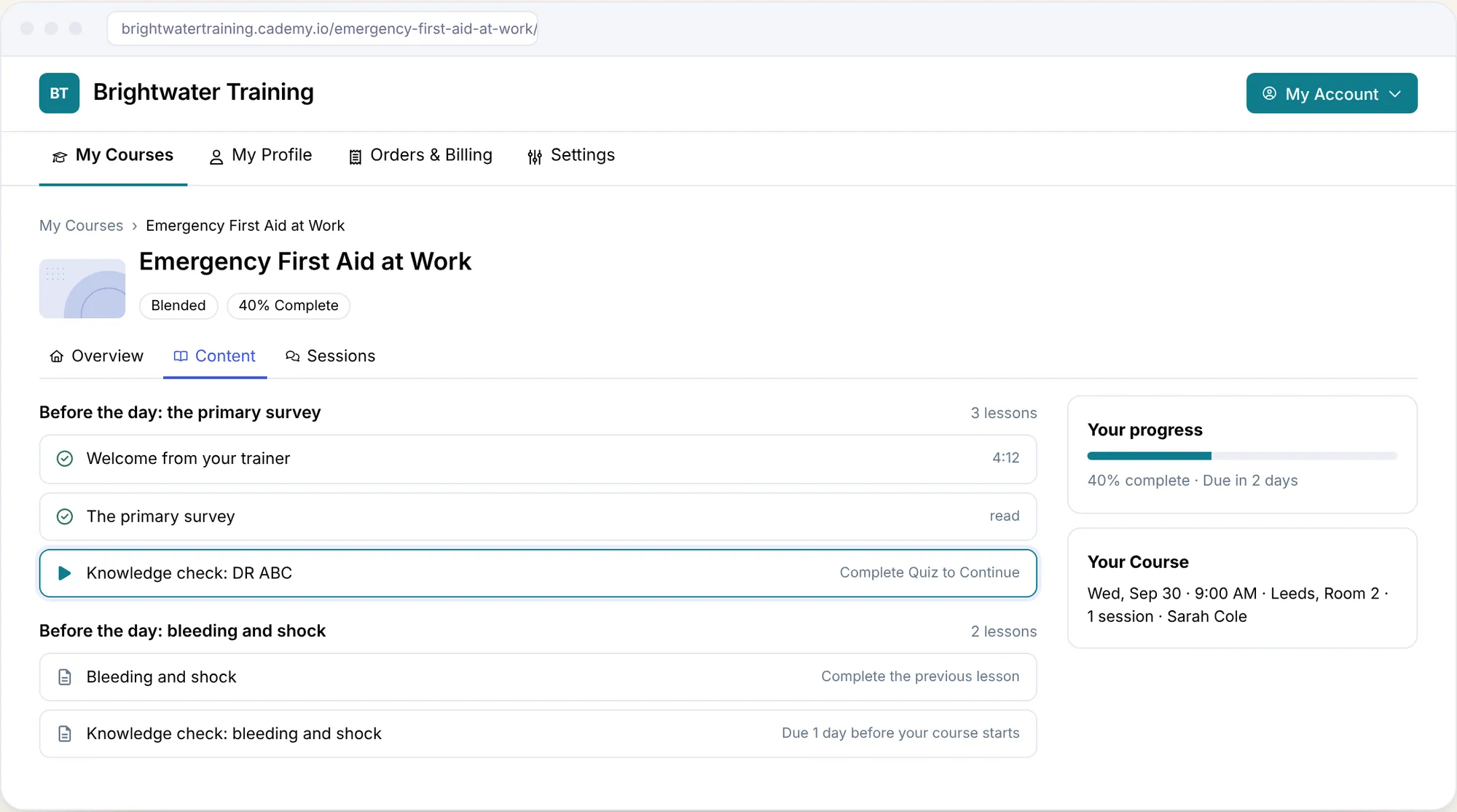
Learners are reminded by email two days before a lesson is due, a day before, on the day and once more if it slips. A required quiz keeps the next lesson locked until the learner reaches the pass mark, so the theory is checked before the day.
The day itself
On the morning of the practical, the trainer opens the course’s Progress tab and sees, lesson by lesson, who has finished, who has started and who has not opened anything. Views such as Not Started and Stuck find the people to chase, and you can email them from the list. Trainers see the Registrants and Progress tabs for the dates they teach and take the register there, and each trainer is scheduled with their working hours, time off and own calendar checked.
One certificate, after both parts
When every session is marked Attended and the lessons reach 100%, the registration turns Completed on its own and Cademy issues the certificate, with an expiry date if the qualification has one and CPD points or hours from Pro. The two parts can finish in either order. A learner who attends with a lesson still open sees it marked Overdue and gets the certificate on the day they finish it, and the person who booked them is told. The blended learning page walks through it screen by screen.
Sold the way your clients buy
A blended date sells like any other: on your booking site or your own website, by card, PayPal or Klarna, with a waitlist when it fills. Employers can book several places and name the people later, pay by invoice with their PO number (from Pro), and follow each person’s progress and download their certificates from their own account. Private dates for one client’s team are available from Pro.
“A game changer for us running training across multiple locations. It keeps everything connected: bookings, facilitators, payments and delivery, all in one place, whether the course is online, in person or blended.”
Dawn Cookman, Warmur Academy
Priced for every size of provider
Blended courses, the course builder and the LMS come with every plan, Free included. Pro is $129 a month billed yearly with one admin and ten facilitator seats, and Teams is $649 (£499) with five admins, 50 facilitator seats, 5,000 registrations a year and SCORM. Paid plans have no per-registration fee and no implementation fee, and Cademy is rated 4.9 from 102 reviews, the highest of the platforms here with enough reviews to rate. Moving from Arlo, Cademy’s team brings your data across with a dedicated importer, and existing SCORM courses upload on Teams.
To see one of your own courses run as a blend, book a call and we will build the online part with you.
Frequently asked questions
What is the best blended learning platform for training providers? Cademy, in our comparison of eight. One course holds the online lessons and the dates people book, deadlines follow each learner’s date, and the certificate is issued once the learner has attended and finished the lessons, on every plan including Free. Teachbox is the runner-up. TalentLMS and Docebo suit training your own staff, and LearnWorlds suits an online academy with live webinars.
What is a blended learning platform? Software that runs a course with two parts: lessons a learner works through alone, online, and sessions led by a trainer, in a room or live online. For a training provider it also needs to sell the course, time the online part to the date each learner booked, and issue the certificate when both parts are done.
Can I run blended courses in a training management system? Yes, if it has its own LMS or connects to one. Cademy and Teachbox include lessons and quizzes, Cademy on every plan and Teachbox from Professional. Arlo and accessplanit sell e-learning as an add-on or module, Administrate connects to a separate LMS, and Dante does not offer e-learning.
Do I need SCORM for blended learning? Only if you already have courses made in an authoring tool such as Articulate. Lessons built from video, documents and quizzes inside the platform do the same job when you are building a course from scratch. Cademy takes SCORM 1.2 packages on Teams, Teachbox on Advanced, Arlo with its SCORM hosting add-on, and LearnWorlds from Pro Trainer.
How do certificates work on a blended course? The certificate should wait for both parts: attendance on the day and completion of the online lessons. In Cademy the registration turns Completed and the certificate is issued as soon as both are true, in either order. Ask any other vendor to show you a learner who attended but did not finish the lessons.
How much does a blended learning platform cost? Cademy includes blended courses on every plan, from free to $649 a month billed yearly for Teams. Teachbox charges $160 a month per admin license for the plan with e-learning, Arlo adds $149 a month for authoring and SCORM on top of its license and registration fees, and LearnWorlds starts at $44 a month billed annually plus $5 per enrollment, while Docebo and Administrate quote.
Sources
Features and prices checked 19 November 2026 on the vendors’ own websites and help centres (Arlo prices and add-ons 9 November); review figures checked 16 November 2026. Vendors change prices and features; check before you decide.
Show all 11 sources
- Cademy: blended learning, course builder, trainer availability, pricing
- accessplanit: e-learning module, e-learning courses overview, US price list (PDF)
- Administrate: overview for AI and search, pricing
- Arlo: blended learning, e-learning authoring and delivery, e-learning, pricing
- Docebo: blended learning, attending instructor-led courses, pricing
- LearnWorlds: live sessions, pricing
- TalentLMS: instructor-led training units, certifications
- Teachbox: course management, pricing
- Research: Means and colleagues (2013), The Effectiveness of Online and Blended Learning, Teachers College Record, Roediger and Karpicke (2006), Test-Enhanced Learning, Psychological Science
- Standards: Blended Learning in First Aid Quality Assurance Standards, version 5 (30 June 2026)
- Review sites: Capterra, G2 and Trustpilot profiles for each vendor, as linked in Best Training Management Software