Training Certificate Template: Free, Editable and Ready to Mail Merge
A free training certificate template for Google Docs and Word, a list that fills it for a whole course at once, and what a certificate has to show.
On this page
A training certificate template saves time only if you can fill it for a whole course at once. The free template below comes as a Google Doc you can also download for Word, with a matching spreadsheet. You list each learner once in the spreadsheet, and a mail merge turns every row into a finished certificate with the right wording, dates, hours and a unique number.
Key takeaways
- The template has two files: a certificate in Google Docs or Word, and a certificate list in Google Sheets or Excel. The list’s column headers match the tags in the certificate, so a mail merge fills one certificate per row.
- A training certificate should show the learner’s name, the course, your organization, the date, the hours and any CPD, the expiry date where the subject has one, the accrediting body if there is one, and a unique number.
- Call it a certificate of attendance when there was no assessment, of completion when the learner finished the course, and of achievement when they passed an assessment. The list writes the matching sentence for each.
- Some certificates are not yours to issue. In England, the awarding organization issues the certificate for a regulated qualification, and in the US only OSHA-authorized trainers can issue Outreach Training Program cards.
- Number every certificate, keep the number on your own record, and freeze the numbers once issued so they never change.
The template
The template is two files, already linked by their column names.
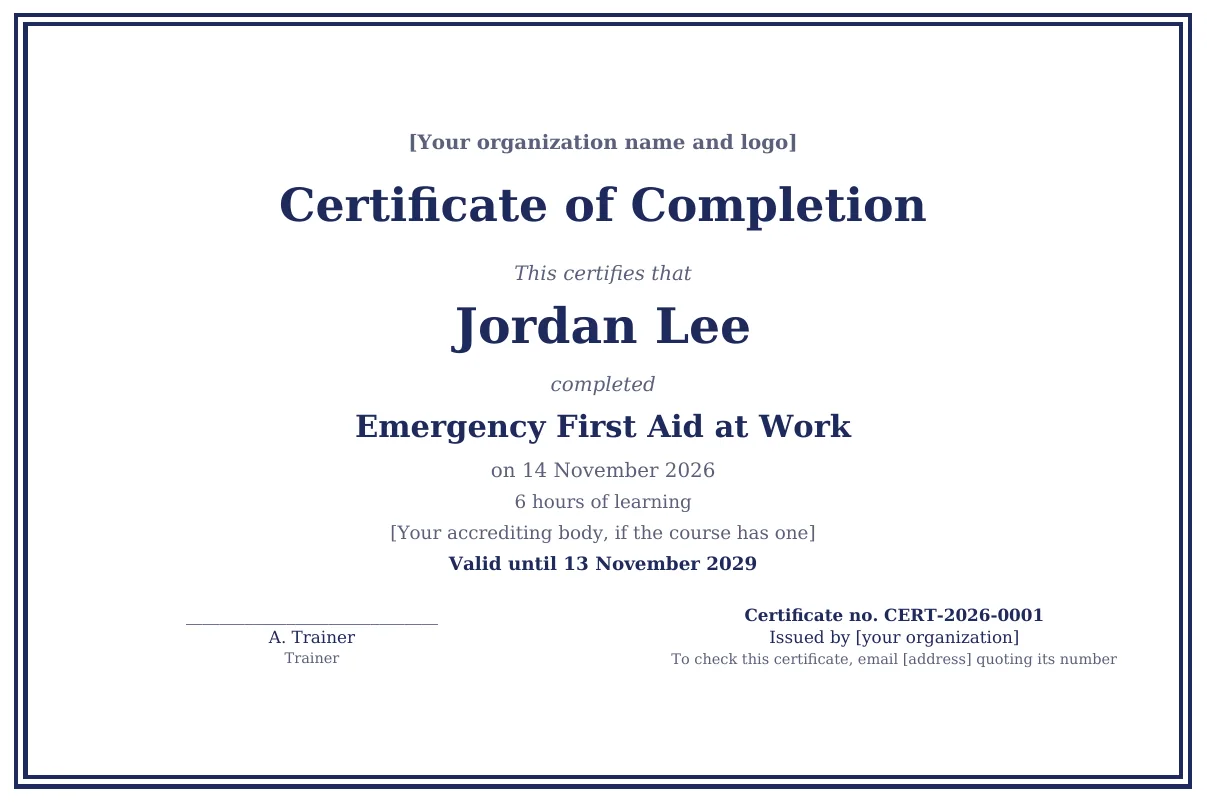
- The certificate: make a copy in Google Docs or download it for Word. It is a one-page horizontal certificate with a border, a line for your organization and logo, and tags such as
<<Learner name>>where the details go. - The certificate list: make a copy in Google Sheets or download it for Excel. It has a Learners tab with one row per learner, a Settings tab for the date format, number prefix and CPD unit, and a How to use tab.
You type into nine columns of the Learners tab. Five more fill themselves: the certificate number, the verb that matches the certificate type, the date written out in full, a line for the hours and CPD, and a line for the expiry date. Those lines are empty when there is nothing to show, so a course with no CPD or no expiry does not print an empty label.
The certificate is set to A4. For US Letter, change the paper size under File, then Page setup, in Google Docs, or under Layout, then Size, in Word. To match your brand, change the font and the border color; the tags keep working.
What goes on a training certificate
A certificate is read by people who were not on your course: the learner’s employer, an auditor, a professional body. It has to answer their questions without anyone phoning you. These are the details the template carries, and the column each one comes from.
| On the certificate | Column in the list | Example | Why the reader needs it |
|---|---|---|---|
| The learner’s full name, as on their ID | Learner name | Jordan Lee | To match the certificate to the person |
| The course title | Course title | Emergency First Aid at Work | To know what was learned |
| The type of certificate | Certificate type | Completion | To know whether there was an assessment |
| The date | Date | 14 November 2026 | To know how recent the training is |
| Hours of learning and any CPD | Hours, CPD | 3 hours of learning · 3 CPD hours | To claim them with a professional body |
| The accrediting or awarding body, if any | Accreditation | Your accreditation line, as your body words it | To know the standard behind the course |
| The expiry date, where the subject has one | Valid until | Valid until 13 November 2029 | To know whether it still counts |
| The trainer | Trainer | The trainer’s name | To trace who taught or assessed the learner |
| A unique number | Certificate number | CERT-2026-0001 | To check it against your records |
Your organization’s name, logo and contact details go into the certificate itself, once, because they are the same on every certificate. The template also has a line telling the reader how to check a certificate, with a space for your email address. Training certificates and CPD covers verification, expiry and renewals in more depth.
Attendance, completion or achievement
The title tells the reader what the learner did, so pick the one that is true for the course.
| Certificate type | Use it when | The sentence the template prints |
|---|---|---|
| Attendance | The learner was there, and there was no assessment | Jordan Lee attended Managing Difficult Conversations |
| Completion | The learner finished every part of the course | Jordan Lee completed Emergency First Aid at Work |
| Achievement | The learner passed an assessment | Jordan Lee successfully completed and passed Fire Warden Training |
Issue the certificate on evidence. For a classroom course, that means the learner was marked as attended and, where there is an assessment, passed it. For an online course it means they completed it, and for a blended course both. Add a learner to the list only when that is true.
What some bodies ask for
Where an accrediting or regulatory body is involved, its rules on certificates come first. Four common cases:
| Course | Who issues the certificate | What it should show |
|---|---|---|
| A CPD-certified course, through the CPD Certification Service (UK) | You do. The CPD Certification Service also offers to issue verifiable certificates for you, with its logo and a QR code | The attendee’s name, the title of the training, your organization, the date and the number of CPD hours |
| First aid at work (UK) | You do, as the training provider | The training organization, the qualification, the individual, a validity of three years from completion, the regulations it was issued under, and a statement that teaching followed currently accepted first aid practice (HSE, L74) |
| A regulated qualification (England) | The awarding organization, under Ofqual’s rules | Set by the awarding organization. A certificate of attendance from you gives the learner something to show until theirs arrives |
| OSHA 10-hour and 30-hour Outreach training (US) | OSHA-authorized trainers, who must give each student their card within 90 days of the class | The card itself. OSHA encourages trainers to hand out their own training certificates at the end of the class, and an employer decides whether to accept one in place of the card |
The CPD Certification Service sets out the content for a certificate of attendance in its guidance for providers, and describes the alternative in its Delegate Certificate Service. OSHA’s rules are in its Outreach Training Program FAQs, which also note that the cards do not expire. If your course is accredited by another body, check its own rules before you print: some ask for a provider number, a logo used in a set way or specific wording.
How to issue certificates for a whole course
- 1Copy both files
Make your own copy of the certificate and of the certificate list, or download both for Word and Excel.
- 2Set it up once
Add your organization, logo and contact email to the certificate, and set the date format, number prefix and CPD unit on the Settings tab.
- 3Fill the list from the register
One row per learner who earned a certificate, typed or pasted from your register. Delete the three example rows first.
- 4Run the merge
Google Docs with an add-on, or Word's own mail merge. Check the first two certificates before you send any.
- 5Send and record
Email each certificate to the learner, and to whoever booked them if they ask, and keep the list as your record of what was issued.
In Google Docs, use a document merge add-on from the Google Workspace Marketplace. autoCrat is a widely used one: you point it at the certificate as the template and the Learners tab as the data. It reads tags written as <<Learner name>>, which is how the template is written, makes one PDF per row and can email each one as an attachment.
In Word, download both files and open the certificate. On the Mailings tab, choose Select Recipients, then Use an Existing List, and pick the certificate list. When Word asks which table to use, choose Learners. Then replace each tag with the matching field through Insert Merge Field. Word shows column names with underscores, so <<Learner name>> becomes the field Learner_name. Preview the results, then use Finish & Merge to print the certificates or save them as one document. Microsoft’s guide to mail merge from an Excel spreadsheet walks through each screen.
Either way, name each file after the learner and the course, such as “Jordan Lee - Emergency First Aid at Work.pdf”, so it is easy to find when someone asks for a copy.
Numbering certificates
The list numbers each certificate as the prefix from Settings, the year of the course date and the row number: CERT-2026-0001, CERT-2026-0002 and so on. Change the prefix to your initials or a course code to make the numbers yours.
A number is only useful if it never changes. Because the formula uses the row, sorting or deleting rows would renumber everything below, so once a batch is issued, copy the Certificate number column and paste it back as values. For the next course, start a new tab or carry on below the last row.
Keep the list after the merge. It is the record of who was certified for what, on which date and until when, which is what you need when a learner loses their certificate, an employer asks you to confirm one, or a renewal falls due.
Frequently asked questions
What should a training certificate include? The learner’s full name, the course title, your organization’s name, the date, the hours of learning and any CPD, the accrediting or awarding body if there is one, the expiry date where the subject has one, and a unique certificate number. The template has a place for each.
What is the difference between a certificate of attendance and a certificate of completion? A certificate of attendance says the learner was there. A certificate of completion says they finished the course, and a certificate of achievement says they passed an assessment. Use attendance when there was nothing to complete or pass.
Can I issue my own certificate for a CPD-certified course? Yes. The CPD Certification Service says the provider gives attendees the certificate of attendance, showing the attendee’s name, the training title, the provider, the date and the CPD hours. It also offers to issue verifiable certificates on your behalf through its Delegate Certificate Service.
Can I make my own OSHA 10 or 30 card? No. Only OSHA-authorized trainers can issue Outreach Training Program cards, and they must give them to students within 90 days of the class. OSHA encourages trainers to hand out their own training certificates at the end of the class, and an employer decides whether to accept one in place of the card.
How do I make certificates for a whole class at once? Put one row per learner in the certificate list, then run a mail merge: in Google Docs with an add-on such as autoCrat, or in Word with Mailings and the list as the recipients. Each row becomes one certificate.
Do training certificates expire? Only where a regulator, an awarding body, a client or you set a period. UK first aid at work certificates last three years from completion. OSHA Outreach cards do not expire. Where a period applies, put the expiry date in the Valid until column and the certificate prints it.
Sources
Rules and guidance checked 16 November 2026 on the publishers’ own pages.
Show all 6 sources
- The CPD Certification Service: How do I obtain a CPD certificate of attendance? and the Delegate Certificate Service
- Health and Safety Executive: L74, First aid at work: Guidance on Regulations
- Ofqual: General Conditions of Recognition, section I: appeals and certificates
- OSHA: Outreach Training Program FAQs
- Google Workspace Marketplace: autoCrat
- Microsoft Support: Mail merge using an Excel spreadsheet