🛡️ Prevent Duplicate Course Registrations
Stop repeat bookings while a participant already has a current course place.
You can now choose whether someone can book a course again while they already have a current place. The new Duplicate Registrations setting checks the person attending, across the whole course, including its other dates and places booked by somebody else.
For example, if Jamie already has a place on an upcoming first aid course, a manager cannot book Jamie onto another upcoming date of that same course while prevention is on. Jamie can still buy places for other people when not attending.
Choose whether a course allows duplicate registrations
Open a course in the Admin Dashboard and go to Edit Course > Settings > Booking Options. Under Duplicate Registrations, choose Allow duplicate registrations or Prevent duplicate registrations, then select Save.
Set the choice separately for each course. New courses start on Allow, so you decide where prevention is useful. It is available on all plans for On set dates, On-demand online course and Blended course. System Admins and Course Owners with access to the course can change it.
Show bookers which participant is already registered
With prevention on, checkout checks the participants when the booker submits Your Details. An affected attendee's form shows “This person is already registered for this course.” The booker can correct an incorrectly entered person or email. To buy fewer places, they can select Back to return to Spaces and reduce the quantity.
There is another check at the final booking step. If it finds a duplicate, the message names the person and course and offers Edit Basket. That rejected attempt does not create another order or take another payment.
The same setting applies when the order owner adds or invites participants, replaces someone, transfers their own place or adds themselves as a participant. It does not stop changing a purchased option for the same person on the same booked date, or a permitted move of their existing place to another date.
Direct learners back to their existing online course
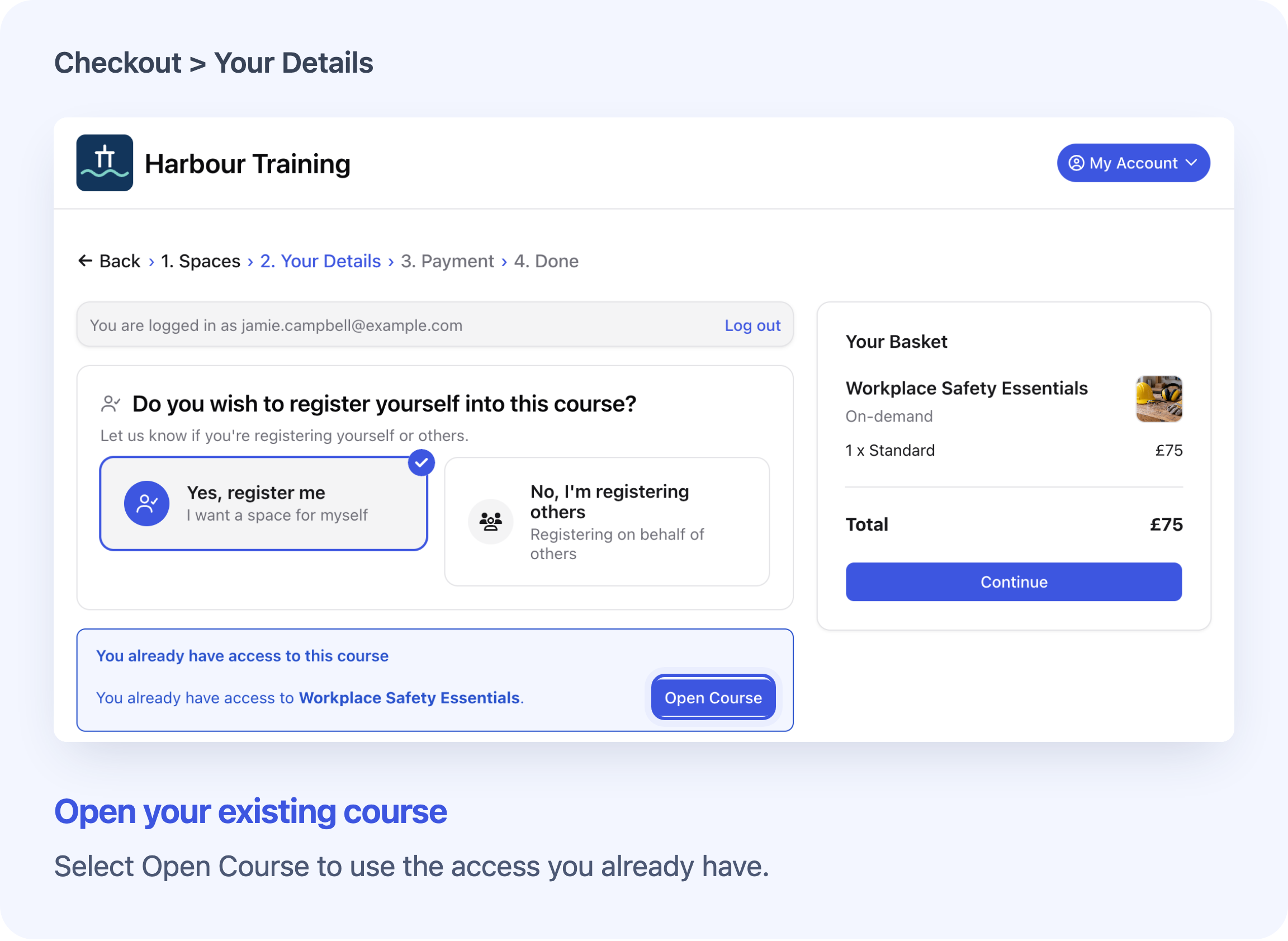
With prevention on, a signed-in learner trying to enrol themselves again can see You already have access to this course with Open Course. The button takes them back to the online access they already have. This also applies to free, private on-demand courses.
Finishing the lessons does not end access. While that access remains valid, prevention still applies. Once the old access expires, that place no longer prevents a fresh on-demand enrolment. Another current place can still prevent enrolment, and the course must still be available to book. The new enrolment has its own course place and access period; the earlier place and learning history remain.
Good to know about current places
- On set dates: a place counts until its date or block has finished. Someone whose only place is on a finished date can book a later run, such as an annual refresher.
- On-demand online courses: a place counts while online access remains valid. Unlimited access does not expire.
- Blended courses: a place counts while its date has not finished or its online access remains valid. Both must have ended before that place stops preventing another booking.
- Unpaid invoice bookings: a current place still counts while its order remains live, so, with prevention on, paying by invoice cannot be used to reserve several dates for the same person.
See Prevent Duplicate Course Registrations for the full setup, booking rules and recovery guidance.
Frequently asked questions
Does this remove duplicate places that already exist?
No. It checks later bookings and participant changes. Your team still needs to review existing duplicates.
Can our team add another registration manually?
Yes. This setting does not hard-block your staff. If Add Registration shows Already Registered, check the existing place before choosing Create Another Registration.
Can someone book again after their place is cancelled?
A cancelled Registration does not count. Another current place on the same course can still prevent a new booking, and the course must still be available to book.
Does it apply to requests, applications or waitlists?
No. It does not check requests, applications, On-request courses or joining a waitlist. Purchases made on an external booking website follow that website's rules.
How does Cademy recognise the same person?
It matches participant email addresses, ignoring capital letters and surrounding spaces. Use each participant's own email. A different email, a place without an email or two checkouts submitted at exactly the same time can escape the check. The setting reduces duplicate bookings; it is not a guarantee that none can occur.
Can an unfinished payment prevent another booking?
Yes. An unfinished card or PayPal checkout can temporarily count as an existing booking until Cademy clears it. Resume the original checkout where possible. If the person cannot find a completed place or continue that checkout, contact Cademy Support with the course, participant email and exact message.
For the detailed access rules, see Set and Change Course Access Expiry. For booker actions, see Manage Participants and View Their Course Progress and Certificates.