
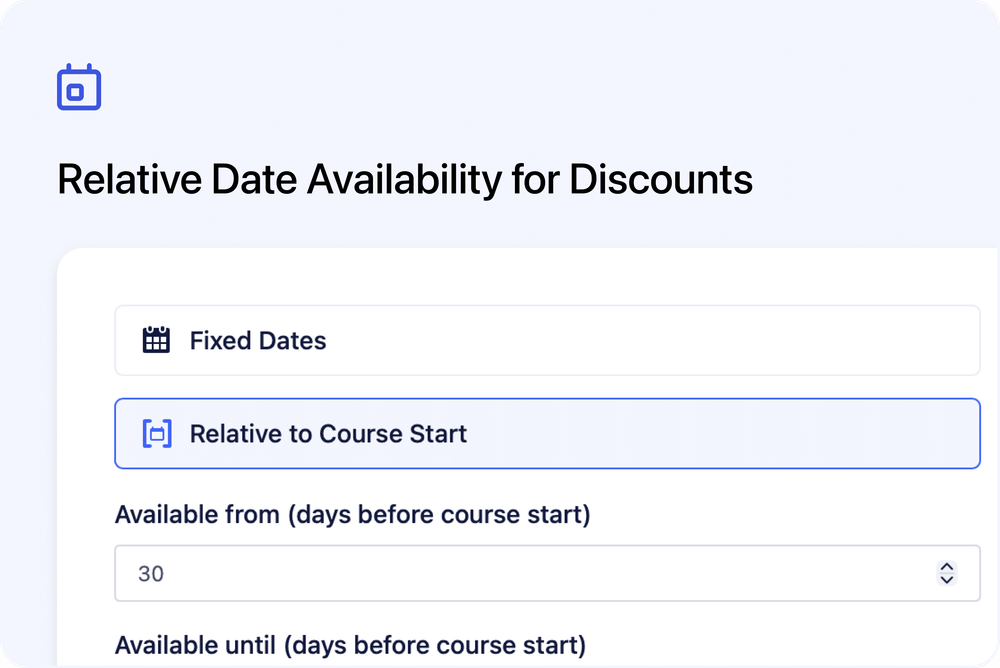
You can now control discount availability based on when a course starts - not just fixed calendar dates.
This makes it easy to create time-sensitive offers like early bird discounts or last-minute promotions tied directly to each course occurrence.
What’s new
📅 Two availability modes for discounts
When creating or editing a discount, you can now choose between:
1️⃣ Fixed Dates (existing behaviour)
Set a start and end date using specific calendar dates.
2️⃣ Relative to Course Start (new)
Define availability based on the number of days before a course begins.
This allows each occurrence to automatically calculate whether the discount is valid - without manually updating dates.
Example use cases
🐦 Early bird discounts
Offer 20% off when learners book at least 30 days before the course start date.
⚡ Last-minute offers
Create discounts that are only valid within a specific window before a course begins.
🔁 Recurring courses
Run the same early bird logic across multiple future dates without editing the discount every time.
How it works
When Relative to Course Start is selected, you can define:
- Available from (X days before course start)
- Available until (Y days before course start)
The discount window is calculated individually for each occurrence.
This applies to:
- Automatic discounts
- Course page discount display
- Promo code validation at checkout
No manual updates required when new dates are added.
Why this matters
Previously, discount availability was based only on fixed calendar dates.
Now, discounts can automatically adapt to each course start date - making it much easier to manage early bird campaigns and time-based promotions across recurring schedules.