
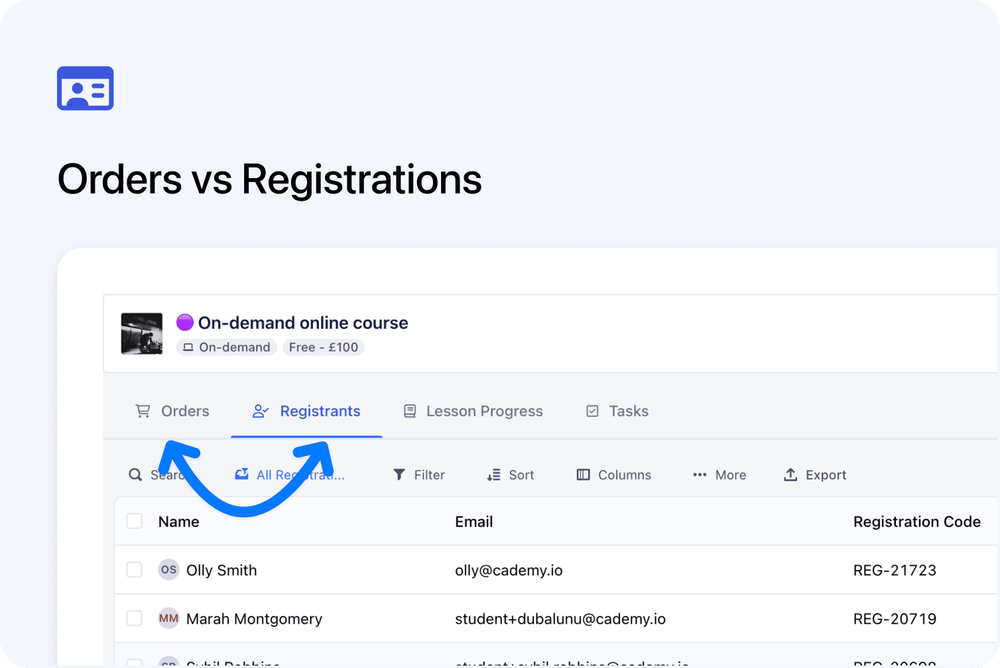
Registrations are now managed separately from Orders inside the Admin dashboard.
An Order is the commercial record. It shows what was purchased, who placed the order, and the billing or payment details.
A Registration is the course record for one registrant on one course or course date.
This update does not change the customer booking experience. It changes how these records are organised and displayed inside the admin.
What’s changed
📦 Orders focus on the purchase
Orders are focused on the commercial side of the record.
An Order includes details such as:
- Who placed the order
- What course or course date was ordered
- Payment status
- Billing details
- Invoice details
- Spaces included in the order
- Related Registrations
This keeps purchase and billing information in the Order record.
🧑🎓 Registrations focus on the registrant
Registrations are focused on the person registered onto a course or course date.
A Registration includes registration-level details such as:
- Registrant details
- Course and course date
- Attendance
- Lesson progress
- Certificates
- Registration fields
- Course-specific information
These details were already part of Cademy. The change is that they now sit on a dedicated Registration record, separate from the Order.
🆔 Each Registration has its own Registration ID
Each Registration now has its own Registration ID.
This makes it easier to identify and reference one registrant’s place on a specific course or date.
This is useful when:
- Checking a specific registrant
- Reviewing attendance or progress
- Managing certificates
- Looking at registration-level information
- Contacting support about a specific Registration
- Working with exports or reports
🔗 Orders and Registrations stay connected
Orders and Registrations are separate, but still linked.
From an Order, you can see the related Registrations.
From a Registration, you can see the related Order.
This helps you move between the commercial record and the course record without combining everything into one view.
Why this matters
Separating Registrations from Orders makes the Admin dashboard easier to understand.
It gives your team a clearer way to see:
- What was purchased
- Who is registered
- Which details belong to the Order
- Which details belong to the Registration
This also gives Cademy a better structure for future improvements across reporting, automation, integrations, and course management.
Good to know
Customers are not affected
This is an Admin dashboard change.
Customers can continue to book courses as normal. The public course page and checkout experience have not changed as part of this update.
The same core information is still available
The details you used before are still available, but some information now appears in a more specific place.
Use the Order when you want to review purchase, billing, payment, or invoice details.
Use the Registration when you want to review one registrant’s place on a course or date.