
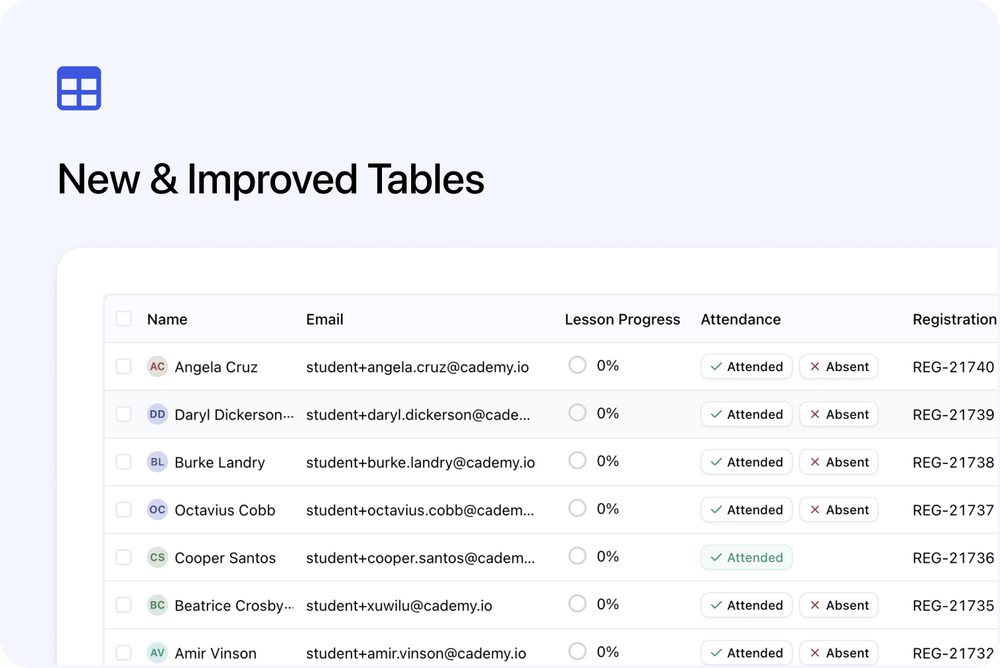
We’ve improved tables in the Admin dashboard, starting with the new Orders and Registrations areas.
Tables are now easier to scan, adjust, and navigate when working with larger sets of data.
What’s changed
↔️ Resizable columns
You can now resize columns to make your table view easier to read.
This is useful for longer values such as course names, organisation names, email addresses, billing details, or custom field values.
🧩 More flexible column views
You can choose which columns are shown in the table.
This helps you build a view that matches the information you need, such as:
- Course
- Course date
- Organisation
- Payment status
- Order code
- Registration code
- Attendance
- Certificate status
- Custom fields
🧭 Easier navigation across wide tables
Tables are easier to move around when you have several columns visible.
This makes it more comfortable to work with detailed records without opening each one individually.
🔎 Improved sorting
Sorting is easier to use, so you can organise records by the fields that matter most to you.
For example, you can sort by dates, names, payment status, Order code, Registration code, attendance status, or certificate status.
🔗 Quick links to related records
Some table values can now link directly to related records, such as Contacts, Organisations, Courses, Orders, or Registrations.
This helps you move through connected records faster.
Why this matters
The improved tables make admin work easier when reviewing Orders, Registrations, and other detailed records.
They help you:
- See the information you need
- Adjust the table to match your workflow
- Work more comfortably with larger lists
- Move to related records faster
Good to know
The new table experience is available in the updated Orders and Registrations areas first.
We plan to use this improved table style in more areas of the Admin dashboard over time.