
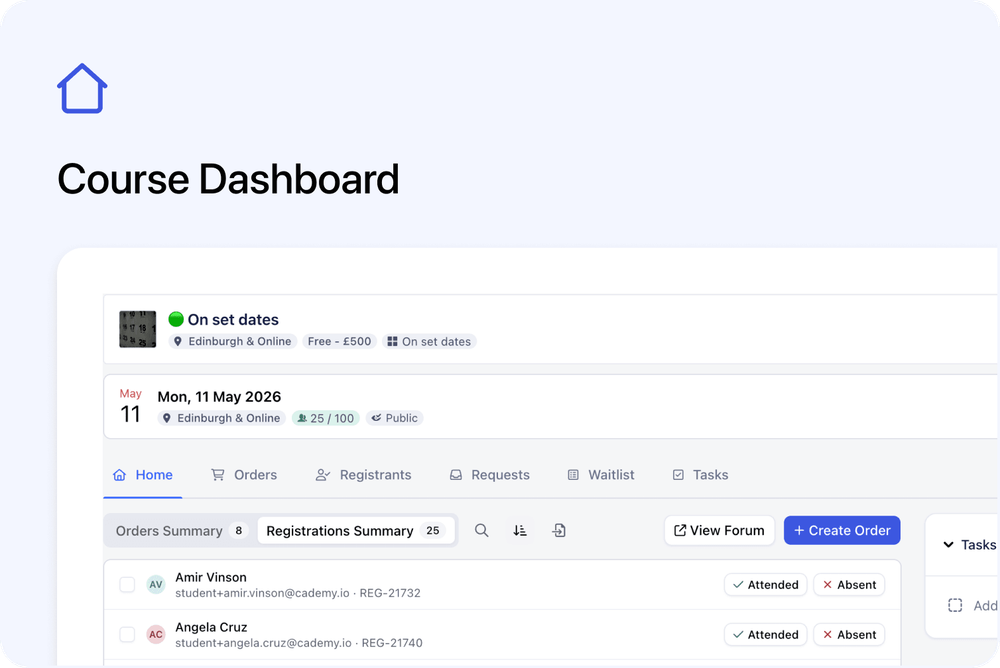
Set date courses now have a clearer Home tab in the Admin dashboard.
Instead of landing straight into a list of dates and bookings, you now start from a course-level dashboard. This gives you a quick overview of the course, its upcoming and past dates, recent Orders, recent Registrants, and related Tasks.
From there, you can still manage dates, create Orders, open Orders and Registrants views, and focus on a specific course date when needed.
What’s changed
🏠 New Course Home tab
Set date courses now include a dedicated Home tab.
This gives you a course-level overview before you open a specific date.
From the Home tab, you can quickly see:
- Upcoming Dates
- Past Dates
- Recent Orders
- Recent Registrants
- Tasks overview
This makes it easier to understand what is happening on the course without opening each date first.
🧾 Orders shown separately from Registrations
The Course page now reflects the new Orders and Registrations structure more clearly.
You can review:
- Orders — the commercial records linked to the course or selected date
- Registrations — the people registered onto the course or selected date
This helps separate the purchase side from the course registration side.
Use Orders when you need to review who placed an order, payment details, billing information, or other commercial details.
Use Registrations when you need to manage the people registered onto the course or course date.
🧾 Recent Orders and Recent Registrants
The Course Home tab now shows recent activity for both Orders and Registrants.
You can switch between:
- Orders — recent commercial records linked to the course
- Registrants — recent people registered onto the course
This helps you quickly check recent activity without leaving the course page.
➕ Quick actions from the Course Home
Common actions are still available from the course page.
From the Course Home area, you can:
- Add a new course date
- Create a new Order
- Open the full Orders view
- Open the full Registrants view
This keeps key course admin actions close to the course overview.
✅ Tasks overview
The Course Home tab also includes a Tasks overview.
This gives you a quick place to see course-related tasks and add new ones when needed.
This is useful for keeping follow-ups, preparation work, and internal admin actions connected to the course.
📌 Course dates now have their own focused view
When you open a specific course date, that date now has its own focused view.
The selected date is shown clearly, and the Orders and Registrants views are filtered to that date.
This means you can focus only on the records linked to that specific occurrence.
For a selected date, you can see date-specific information such as:
- Orders linked to that date
- Registrants linked to that date
- Orders summary
- Registrations summary
This makes it easier to manage one course occurrence without mixing it with the full course view.
✅ Bulk actions for Registrations
You can take action on multiple Registrations from the Course page.
At this stage, this includes:
- Emailing registrants
- Marking attendance
This helps you handle common course admin tasks directly from the course context.
📨 Email the right group of people
The updated Course page makes it clearer whether you are working with Orders or Registrations.
This helps when sending emails because you can choose the group that matches what you need to do.
For example:
- Email people linked to Orders when the message is about the order, purchase, payment, or billing
- Email Registrants when the message is about attending the course
This makes communication more accurate and easier to manage.
Why this matters
The new Course Home makes set date courses easier to manage.
It gives admins a clearer starting point for each course, with the main course information, dates, recent activity, and tasks in one place.
It also makes the difference between Orders and Registrations much clearer:
- Orders show the commercial side of the course
- Registrations show the people registered onto the course or date
When you need to work on a specific course date, you can open that occurrence and focus only on its Orders and Registrants.
This makes the course page more useful both as a course overview and as a place to manage individual course dates.
Good to know
This applies to set date courses
This update is focused on set date courses, where a course can have one or more scheduled dates.
Orders and Registrants are available as tabs
You can open the full Orders and Registrants tabs from the course page.
At course level, these show records linked to the course.
At date level, these show records filtered to the selected occurrence.
Customers are not affected
This is an Admin dashboard update.
Customers can continue to view and book courses as normal. The public course page and checkout experience have not changed as part of this update.