
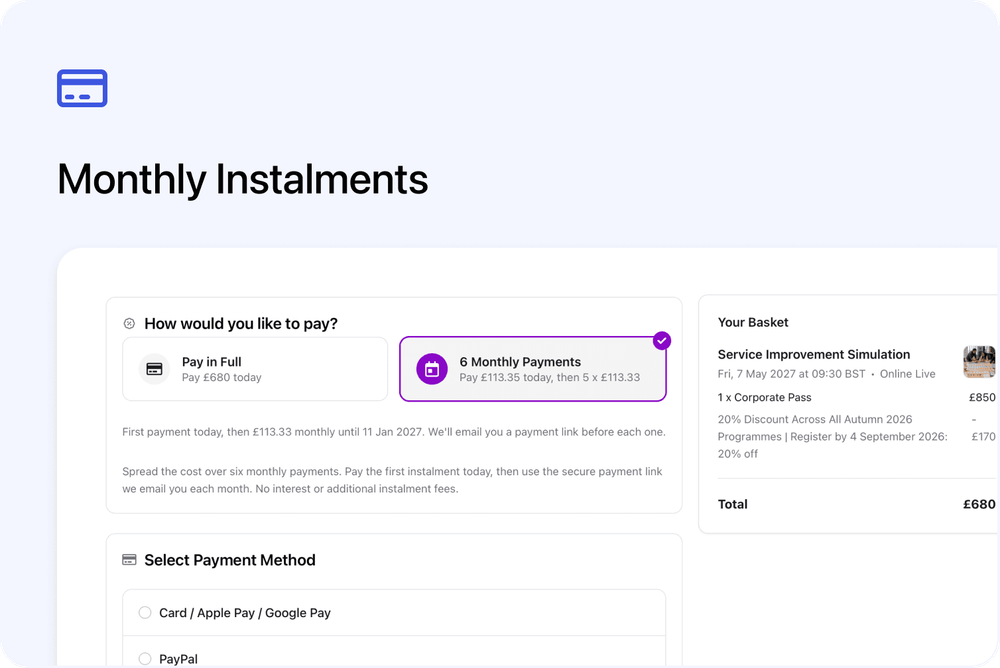
Course providers can now offer monthly instalments directly through Cademy. Choose between 2 and 12 equal monthly payments, decide which courses can use them and add an optional message for customers at checkout.
The customer pays the first instalment when they book. Cademy then keeps the schedule visible, sends reminders and provides payment links for each remaining payment.
This is a native Cademy feature, so the plan is created, tracked and managed inside Cademy.
What’s new
Monthly instalments give you a complete scheduled payment journey inside Cademy. You can:
- Offer between 2 and 12 equal monthly payments.
- Set an account default and add an optional message for customers at checkout.
- Use the account default on each course, choose a different number of payments or turn instalments off for that course.
- Let eligible customers choose Pay in Full or the displayed number of Monthly Payments at checkout.
- Collect the first payment immediately by card, Apple Pay, Google Pay or PayPal, where available.
- Show customers the full schedule, including each amount, date and payment status.
- Send reminders before each payment and a payment link when it is due.
- Show the live schedule, amount paid and amount still due on the Admin order.
- Keep instalment payments aligned with the invoice and Xero when connected.
How it works
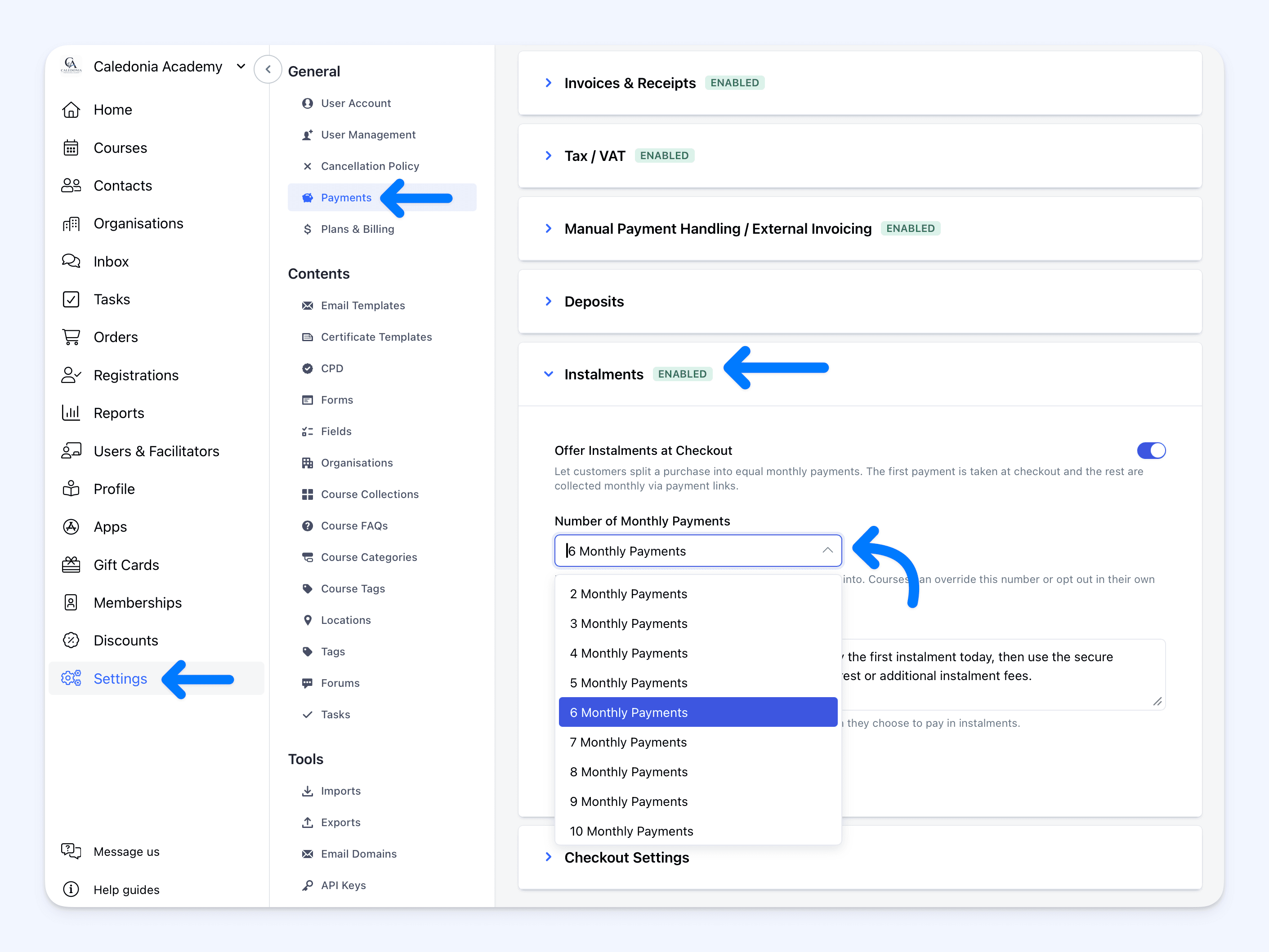
Go to Settings → Payments → Instalments and turn on Offer Instalments at Checkout. Choose a default from 2 to 12 monthly payments and add an optional Customer Message if you need to explain your terms. The message applies account-wide and cannot be changed for an individual course. Select Save to enable the course-level options.
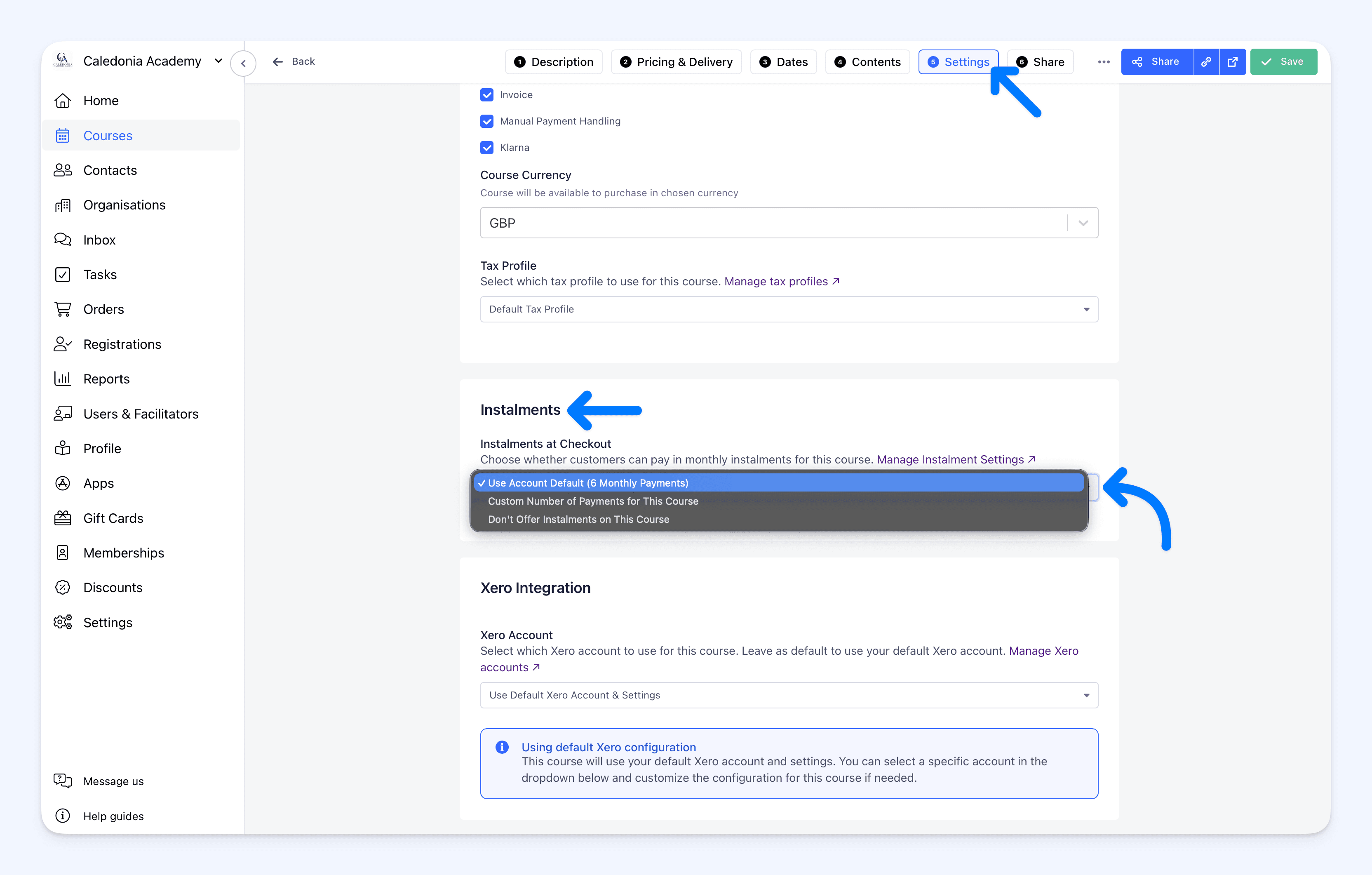
For an individual course, open Course → Settings → Payments → Instalments. You can use the account default, choose a custom number of monthly payments or select Don’t Offer Instalments on This Course.
For complete setup instructions, course-level options, schedule rules and overdue-payment handling, see Monthly Instalments at Checkout.
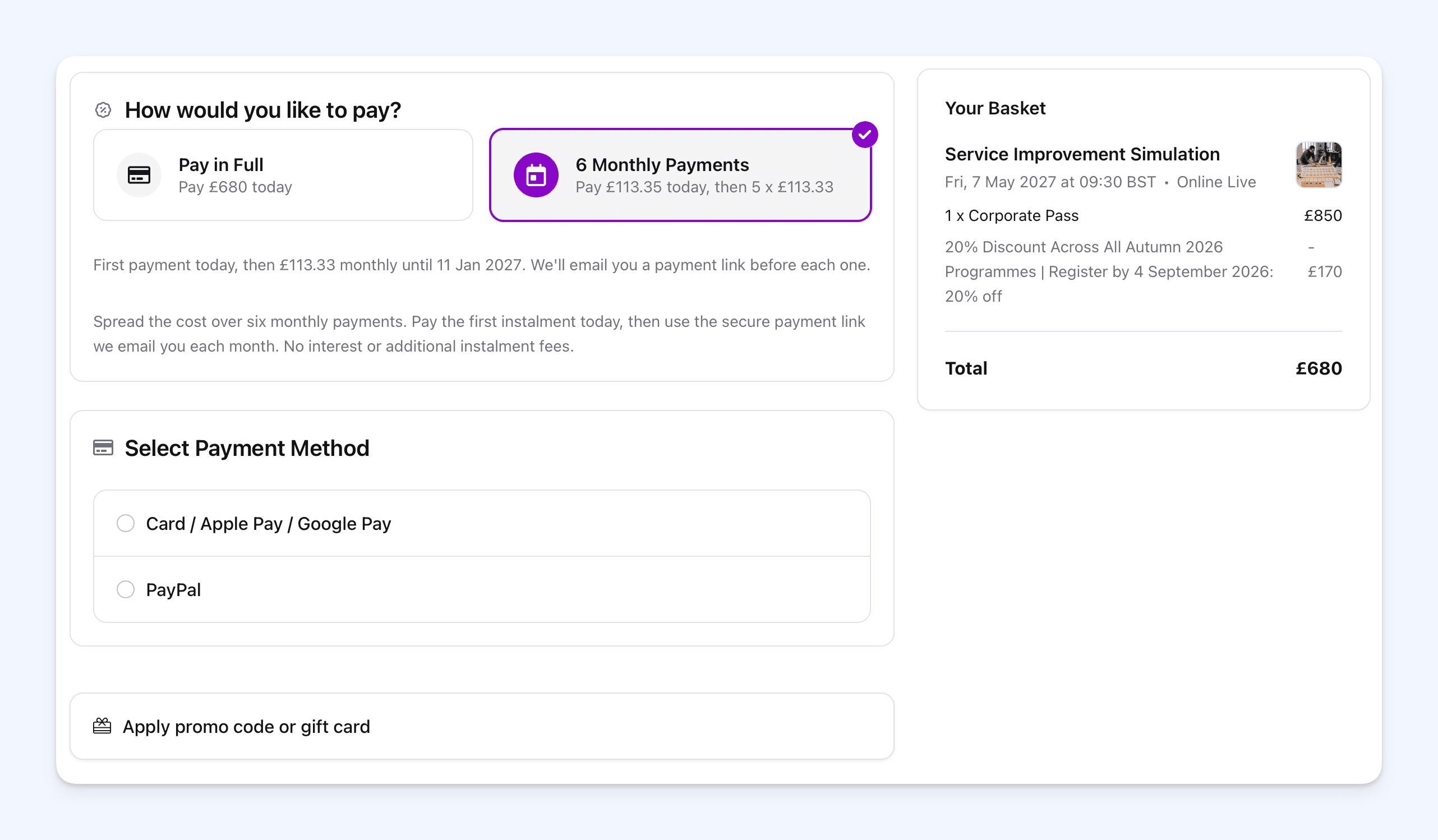
When an eligible customer reaches the payment step, How would you like to pay? shows the available choices. If they choose monthly payments, Cademy shows the first amount due today, the remaining monthly amount and the final payment date. The first payment can be made by card, Apple Pay, Google Pay or PayPal, where available.
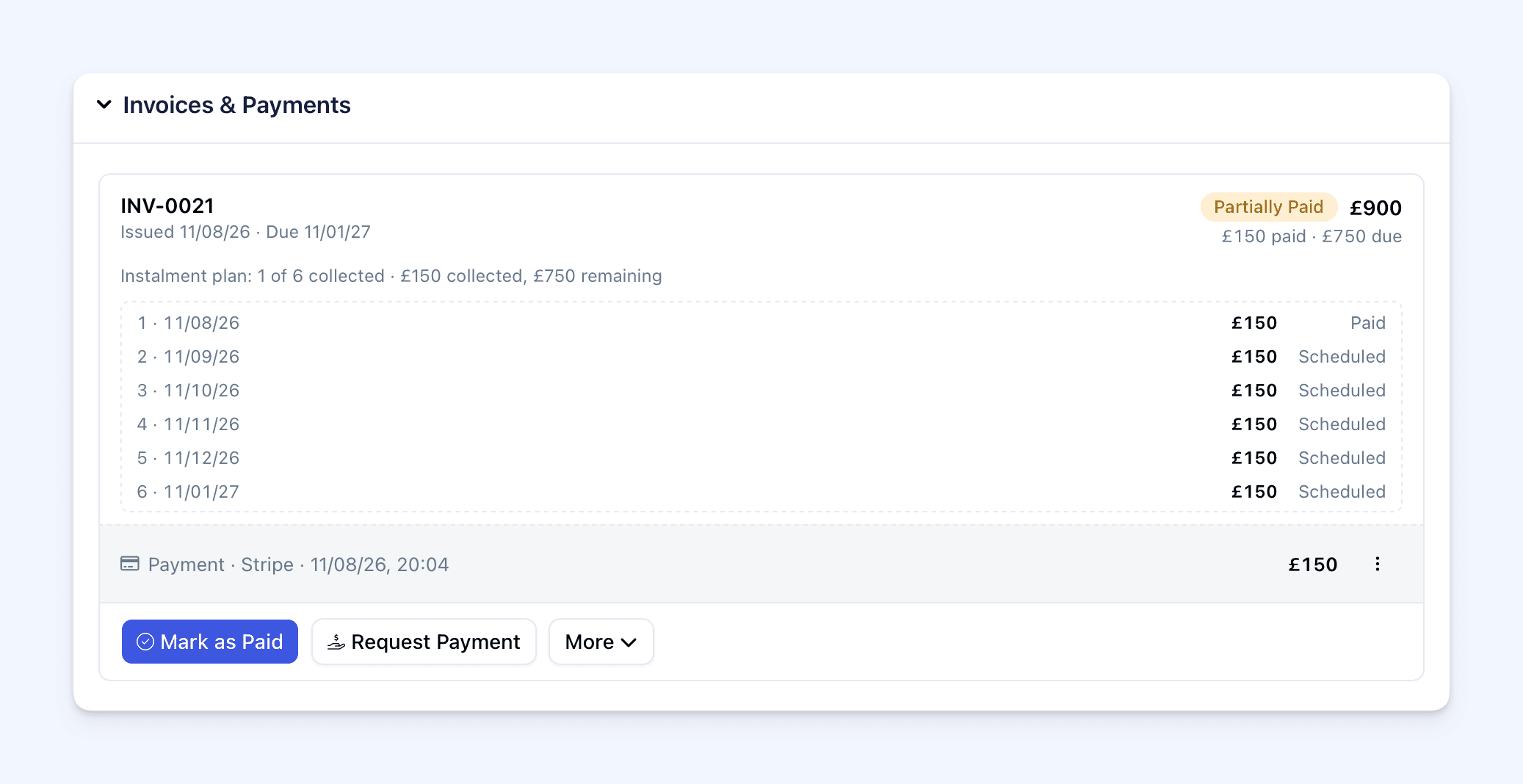
After payment, Cademy creates one invoice for the full order and records the first instalment against it. The confirmation and payment pages show the schedule so the customer can see what has been paid and what comes next.
Later payments are due on monthly anniversaries of the booking date, not the course start date. If that date does not exist in a shorter month, the payment is due on the final day of that month.
Cademy sends the order owner a reminder seven days before each payment is due. On the due date, the order owner receives a payment link for that instalment. The link opens without requiring a login and lets them pay by card, Apple Pay, Google Pay or PayPal, where available.
Customers can follow Pay for a Course in Monthly Instalments for a step-by-step guide to checkout, their payment schedule and later payment links.
Future scheduled instalments cannot be paid early through the automatic payment link. When nothing is due, the payment page shows the next amount and due date instead of a payment button.
If more than one payment becomes overdue, Cademy keeps one live catch-up link for the total currently due. Paying it brings the schedule up to date, and future monthly payments continue as planned. Missed payments do not automatically cancel the order.
In the Admin dashboard, the order shows how many payments have been paid and lists every instalment as Paid, Due, Overdue or Scheduled. Automatically created payment requests are clearly labelled, and the current link can be copied when needed.
If the order total changes, money already collected stays recorded and the unpaid part of the schedule adjusts. A reduction lowers the amount still due before any refund is considered. An increase is added to the final scheduled payment. If you use Xero, the payments continue to be recorded against the matching invoice.
Why use monthly instalments?
Monthly instalments are useful when you want to make a higher-value course easier to budget for while keeping the payment plan inside your normal Cademy workflow.
- Choose the payment length. Offer any number from 2 to 12 monthly payments.
- Control it by course. Use an account default, set a different number for one course or turn the option off where it does not fit.
- Keep the plan inside Cademy. Your team can see every amount, date, payment status, overdue balance and payment link on the Order.
- Use your own customer terms. Add a checkout message and decide how you follow up when a payment is missed.
- Give customers a choice of payment method each month. Each payment link can be paid by card, Apple Pay, Google Pay or PayPal, where available.
This is useful for higher-value courses where you want to offer a longer or more tailored schedule and are comfortable receiving the course fee over time.
Good to know
- Instalments are available on Teams and Custom plans.
- There is no additional Cademy setup, add-on or instalment fee. Teams and Custom plans have a 0% Cademy platform fee.
- Standard Stripe or PayPal processing fees apply to every instalment payment. Because the order is collected through several separate transactions, any fixed per-transaction charge is applied more than once. This can make the total processing cost higher than taking one full payment.
- Customers do not pay interest or an additional Cademy fee for choosing monthly instalments. The order total is simply divided across the schedule.
- You can offer between 2 and 12 monthly payments. The first payment is taken at checkout.
- Later payments are not charged automatically. The order owner pays each one through a Cademy payment link.
- You receive the course fee over time as each instalment is paid. The full order value is not paid to you upfront.
- Customers can use card, Apple Pay, Google Pay or PayPal for instalment payments, where available. Invoice, manual payment and Klarna options are not available when monthly instalments are selected.
- Instalments are offered through public checkout. Admin-created orders do not include the monthly instalment choice.
- Every course in a multi-course basket must allow instalments. If eligible courses use different payment counts, the smallest count is used for the whole order.
- The option is not shown for a free order or when an individual payment would be below the payment provider’s minimum amount.
- Changing the account or course setting affects new checkouts. Existing instalment orders keep their original schedule.
- Cademy does not automatically cancel an order when a payment is missed. The order becomes overdue and the catch-up link collects the amount due at that point.
Where to find it
Open the Admin dashboard and go to:
Settings → Payments → Instalments
You can open the payment settings directly at admin.cademy.io/settings/payments.
For one course, go to:
Course → Settings → Payments → Instalments
Frequently asked questions
Which plans include monthly instalments?
Instalments are available on Teams and Custom plans. Other plans can see the setting but need to upgrade before they can turn it on.
Do monthly instalments cost extra?
There is no additional Cademy setup, add-on or instalment fee. Monthly instalments are included with Teams and Custom, which have a 0% Cademy platform fee. Customers are not charged interest or an additional Cademy fee for using the plan.
Standard Stripe or PayPal processing fees still apply to each separate payment. A plan with several payments creates several transactions, so any fixed per-transaction charge is applied more than once. This means the total processing cost can be higher than taking one full payment. Check your current rates with Stripe or PayPal, or read Cademy Pricing and Plans Explained.
Can I choose a different number of payments for one course?
Yes. Open the course, go to Settings → Payments → Instalments and choose Custom Number of Payments for This Course. You can also turn instalments off for that course.
Are later payments taken automatically?
No. The first payment is taken at checkout. Cademy emails the order owner when each later payment is due, and they pay through the link.
Can a future instalment be paid early?
No. The automatic payment link becomes payable only when an amount is due or overdue. Before then, the payment page shows the next amount and due date.
Which payment methods can customers use?
They can use card, Apple Pay, Google Pay or PayPal, where available. Invoice, manual payment and Klarna options are not available when monthly instalments are selected.
Does the customer need to log in to pay a later instalment?
No. The payment link opens the amount due without requiring a login.
Who receives the instalment payment emails?
Cademy sends them to the order owner. If somebody books places for other participants, those participants do not receive the order owner's payment information or payment links.
What happens if a customer misses a payment?
The order becomes overdue. Cademy keeps one live payment link for the amount currently due. If another instalment becomes overdue, the same catch-up journey updates to collect both amounts together.
What happens when several courses are in the basket?
Every course must allow instalments. If they use different numbers of payments, Cademy offers the smallest number across the basket.
Does Cademy create a separate invoice for every instalment?
No. Cademy creates one invoice for the full order and records each instalment as a payment against it. Connected Xero accounts receive the same payment updates.
Can I create an instalment order from the Admin dashboard?
No. Monthly instalments are a public checkout option. Admin-created orders can continue to use the existing invoice, payment request and partial payment tools.
What happens if I edit an instalment order?
Cademy keeps the amount already paid and adjusts what is still due. Reductions lower the unpaid balance first. Increases are added to the final scheduled payment.
How monthly instalments compare with Klarna and PayPal Pay in 3
Cademy has already supported customers spreading the cost through third-party options such as Klarna and PayPal Pay in 3. Monthly instalments are an additional, native option. They do not replace those payment methods.
| Monthly Instalments in Cademy | Klarna or PayPal Pay in 3 | |
|---|---|---|
| Which Cademy plans support it? | Teams and Custom. | All Cademy plans, provided the relevant payment app is connected. Availability for an individual customer or purchase is decided by Klarna or PayPal. |
| Who creates the plan? | You choose between 2 and 12 monthly payments. | The third-party provider controls the plans available to the customer. PayPal Pay in 3 uses three payments, while Klarna options can vary. |
| Who collects later payments? | Cademy sends reminders and payment links to the order owner. They actively pay each instalment by card, Apple Pay, Google Pay or PayPal, where available. | Klarna or PayPal collects the later payments from the customer automatically. |
| When do you receive the money? | You receive each instalment as the customer pays it. | You receive the full purchase amount upfront, minus applicable fees, while the third party collects from the customer. |
| Are there additional fees? | No additional Cademy setup, add-on or instalment fee, and no interest for the customer. Standard Stripe or PayPal processing fees apply to each separate payment, so the total processing cost can be higher than one full-payment transaction. | Klarna currently costs 4.99% + £0.35 for a minisite or embed booking. PayPal Pay in 3 is included with PayPal Checkout at no additional Pay Later cost, but the standard PayPal transaction fee applies. |
| Where is the schedule managed? | The schedule, payment status, reminders and overdue balance are managed inside Cademy. | The customer’s repayment schedule is managed by Klarna or PayPal. The Cademy order is treated as paid at checkout. |
| What happens if a payment is missed? | Cademy marks the order overdue, sends reminders and creates one catch-up link. You remain responsible for following up on the unpaid balance. | Klarna or PayPal manages missed repayments with the customer. |
Use monthly instalments in Cademy when you want control over the number of payments, visibility of the full schedule and payment activity connected to the Order. Klarna or PayPal Pay in 3 may suit you better when receiving the full amount upfront and handing later collection to a third party is more important.
You can continue to offer Klarna and PayPal where enabled. PayPal Pay in 3 is offered within PayPal when it is available for the customer and purchase.