
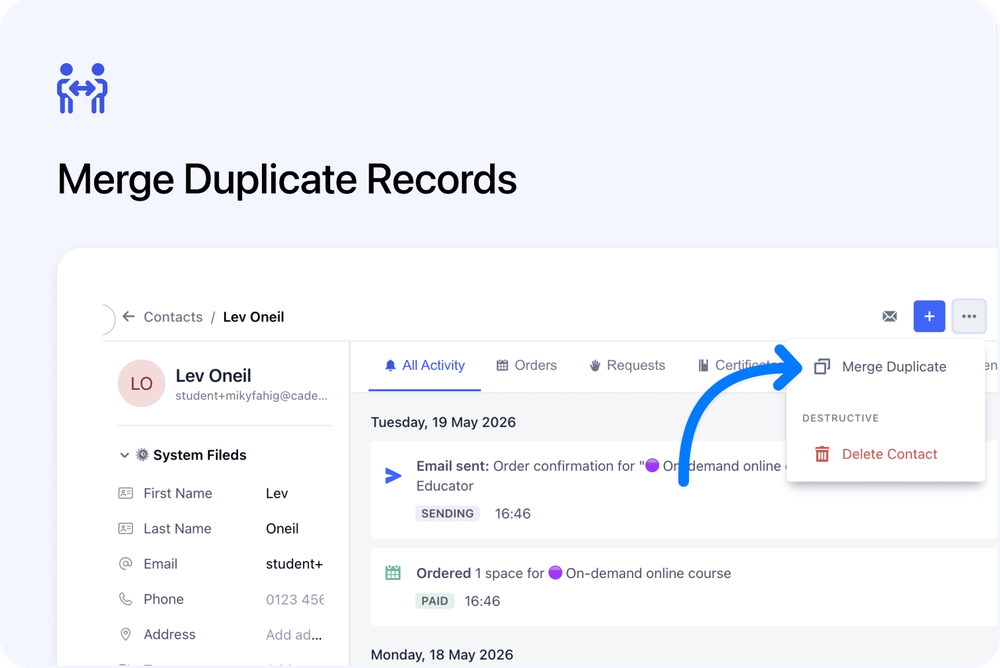
You can now merge duplicate Contacts and Organisations directly from their record pages.
Open the top-right menu, choose Merge Duplicate, select the existing Contact or Organisation you want to merge into, then confirm the merge.
This gives admins a clearer way to clean up duplicate records when they find them.
What’s new
🔀 Merge from the record page
A new Merge Duplicate option is available from the top-right menu on:
- Contact pages
- Organisation pages
This lets you start a merge directly from the record you are viewing.
🔎 Search for the record to merge into
The merge dialog lets you search for an existing Contact or Organisation.
The current record is excluded, so you cannot merge a record into itself.
The selected record is the one that remains after the merge.
📋 Clear merge rules before confirming
Before confirming, the dialog explains what will happen.
The current record will be merged into the selected record and then archived.
Existing populated details on the selected record are protected where relevant, while useful details from the current record can be copied across.
Tags are combined, and related records are moved to the selected record.
What moves across
When records are merged, related information is moved to the selected record where relevant.
For Contacts, this can include:
- Orders
- Registrations
- Subscriptions
- Messages
- Notes
- Certificates
- Vouchers
- Other contact history
For Organisations, this can include:
- Contacts
- Notes
- Orders
- Registrations
- Related organisation records
Why this matters
Duplicate records can happen over time, especially when different people use different email addresses, organisation names, or booking details.
This update gives admins a direct way to tidy up duplicates from the record page, without needing to use a hidden or indirect merge flow.
It keeps the existing merge behaviour, but makes it easier to find and use when needed.
Good to know
The selected record is the one that stays
When merging, the record you select in the dialog is the surviving record.
After the merge, you will be taken to that record.
This is for existing records only
The merge flow is designed for duplicate Contacts or Organisations that already exist in your account.
You cannot create a new Contact or Organisation from the merge dialog.