
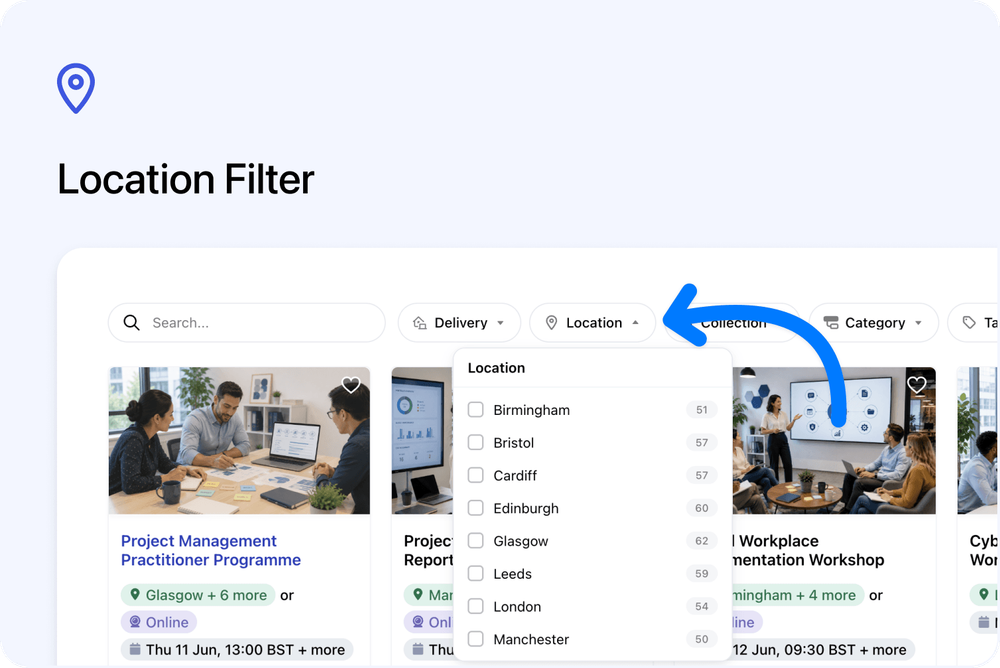
Visitors can now filter courses by Location on your public mini-site and course embeds.
The new Location filter appears alongside the existing Delivery, Categories, and Tags filters, helping visitors narrow your course list by city.
What’s new
📍 Filter courses by city
A new Location filter is now available on course search.
Visitors can select one or more cities to show courses available in those locations.
This is useful when someone wants to find courses close to home, near work, or in a specific city.
🔢 City counts are shown
Each city in the Location filter shows a count.
This helps visitors see how many courses are available in each city before selecting a filter.
The Location filter works in a similar way to the Tags filter, where more than one option can be selected.
🔎 Locations are based on your courses
The list of cities is created automatically from the courses shown in the current results.
This means you do not need to set up a separate location list.
The filter uses the city names from your course locations.
🌐 Available on mini-sites and embeds
The Location filter appears on:
- Public Cademy mini-sites
- Embedded course search on your own website
On mini-sites, selected filters are reflected in the page address, so filtered views can be refreshed or shared.
On embeds, the filter works inside the embed without changing the page address.
Why this matters
Location is often one of the first things visitors check when looking for an in-person course.
The new Location filter helps visitors find relevant courses faster by showing them the cities where your courses are available.
This can reduce scrolling, make your course catalogue easier to browse, and help visitors focus on courses they can attend.
Good to know
Online courses stay under Delivery
Online-only courses do not have a city in the Location filter.
Visitors can continue to find online courses using the Delivery filter.
City names come from your course locations
The filter uses the city names entered on your course locations.
For the cleanest filtering experience, keep city names consistent across your courses and course dates.
For example, using London consistently is better than mixing London and london.
No extra setup needed
The Location filter is created automatically from your course location data.
To make the most of it, make sure your in-person courses and course dates have clear location details.