
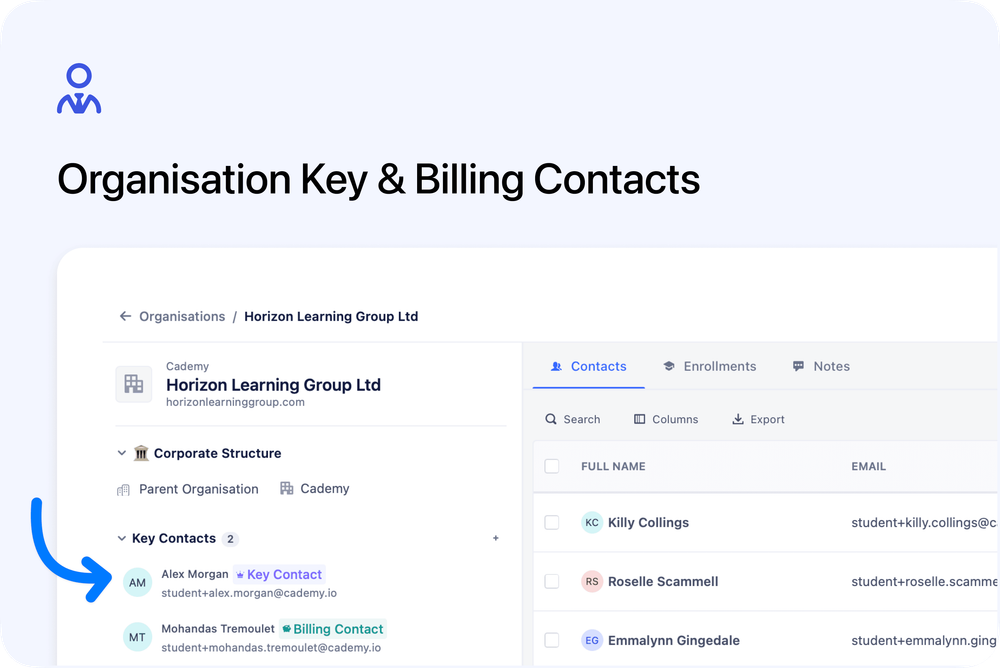
You can now assign Key Contact and Billing Contact roles to contacts within each organisation. This makes it easy to identify the right person for general enquiries, coordination, or invoicing — without searching through every linked contact.
What’s new
🏷️ Key Contact role
Designate a main point of contact for an organisation. This is your go-to person for planning, communication, and day-to-day coordination.
💳 Billing Contact role
Clearly identify who handles invoices and payment queries. No more guessing where finance communications should go.
👤 Flexible role assignment
- A contact can hold one or both roles
- Multiple key contacts can be assigned per organisation
- Roles can be added or removed at any time
📍 Dedicated Key Contacts section
Each organisation now includes a Key Contacts section, showing:
- Contact name and email
- Clear role badges
- Quick links to open the contact record or send an email
🔄 Synced across organisation and contact pages
When viewing a contact, their organisation roles are displayed alongside the organisation name. Updates made on the organisation page are reflected instantly on the contact page.
How to use it
- Open any organisation
- Find the Key Contacts section
- Click Add a Key Contact
- Search for an existing contact (or create a new one)
- Select the relevant role(s) and assign
You can remove roles at any time. Changes apply immediately.
This feature is designed to reduce searching, clarify responsibilities, and help your team communicate with the right people faster.