
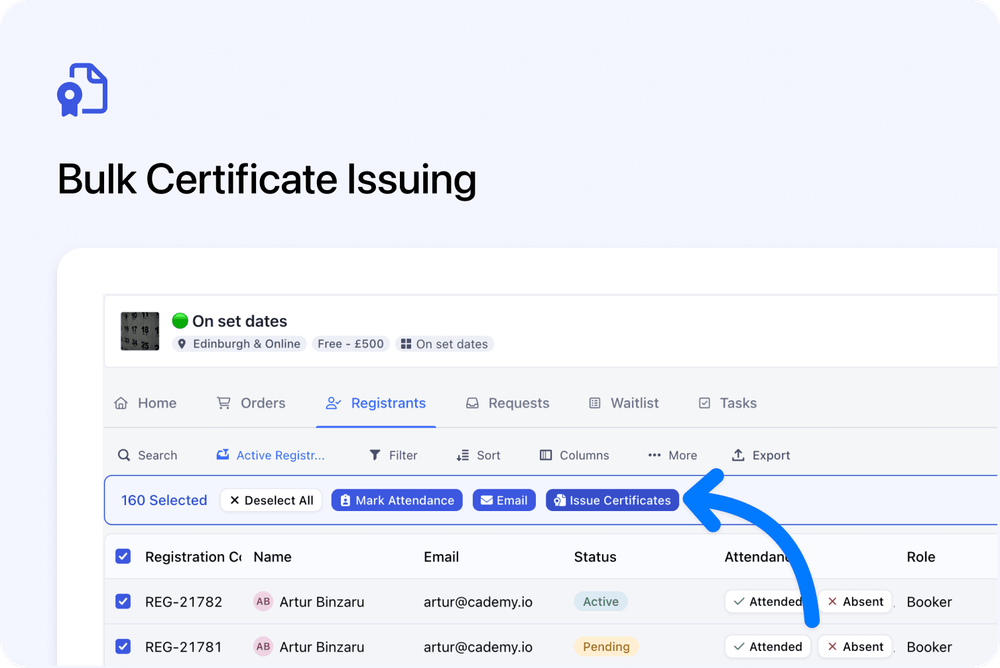
You can now issue certificates to multiple registrants at once from the Registrants tab.
Select the registrants you need, click Issue Certificates, and choose how the certificates should be delivered.
This makes it much faster to issue certificates after a course date, especially when working with larger groups.
What’s new
✅ Issue certificates for multiple registrants
From the Registrants tab, you can now select multiple registrants and issue certificates in bulk.
You can use filters first to find the right group, then select the registrants you want to include.
This is useful when you need to issue certificates for:
- A full course date
- A filtered group of registrants
- Registrants marked as attended
- Selected individuals from a larger list
📍 Where to find it
To issue certificates in bulk:
- Go to the Registrants tab
- Filter or select the registrants you want
- Click Issue Certificates
- Choose how the certificates should be delivered
- Confirm by clicking Issue Certificates
Delivery options
📦 Issue only (no email)
Generate the certificates without sending any emails.
A ZIP file will be made available for you to download from the dialog.
📧 Issue & email registrants
Send each registrant their own certificate email.
Use this when each person should receive their certificate directly.
📨 Issue & email registrants and primary contacts
Send each registrant their own certificate email.
Primary contacts also receive grouped ZIP links for the relevant order or booking.
👤 Issue & email primary contacts only
Send grouped ZIP links to the primary contacts only.
Use this when the main booker or organisation contact should receive the certificates instead of each registrant.
✉️ Issue & email a manual address
Send one ZIP link to a manually entered email address.
Use this when certificates need to be sent to a specific person or shared inbox.
Why this matters
Bulk certificate issuing saves time when managing course completion.
Instead of opening each registration one by one, you can select the right registrants, choose the delivery method, and issue certificates in one action.
This is especially helpful for larger course dates, organisation bookings, and teams that need to send certificates to different people depending on the workflow.
Good to know
Existing active certificates are included
When issuing certificates in bulk, existing active certificates are included in the ZIP where relevant.