
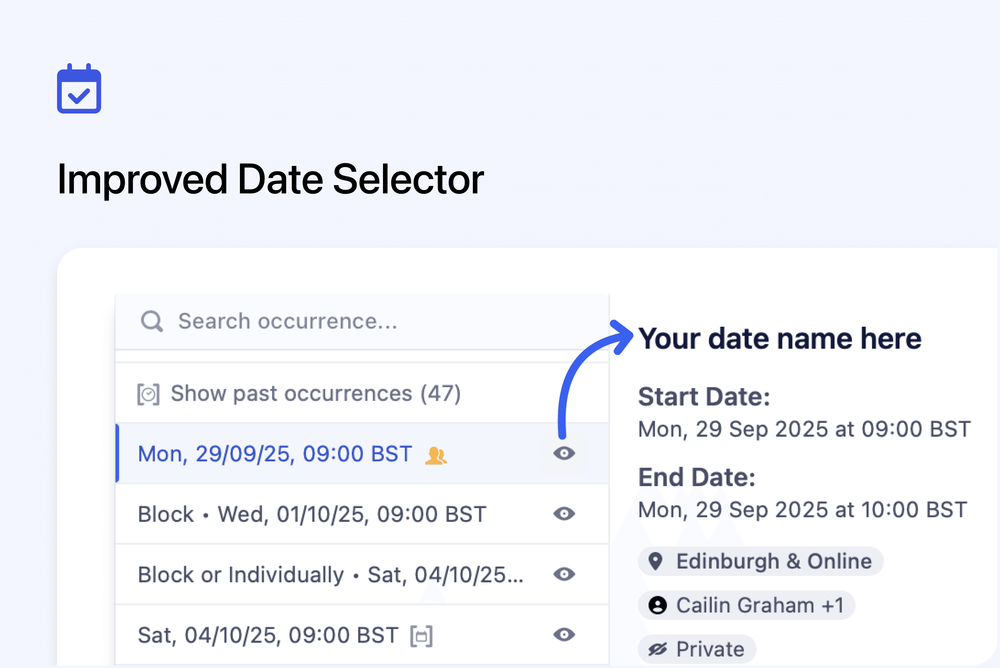
We’ve redesigned the date selector to make it faster and easier to find the right course session. The updated dropdown now highlights upcoming dates first, adds clear status icons, and gives you instant access to full details without leaving the menu.
Key improvements include:
👁️ Detail Panel: Click the eye icon to see start/end times, location, facilitators, spaces, and visibility.
🔄 Smart Filtering: Past dates are hidden by default, with an option to show them all when needed.
🎨 Status Icons: Clear icons for past dates, no spaces available, and child dates.
⚡ Smooth Performance: Faster scrolling and a cleaner, more consistent design.
This update makes it easier to manage and select the right date, while still giving you access to past sessions when needed.