
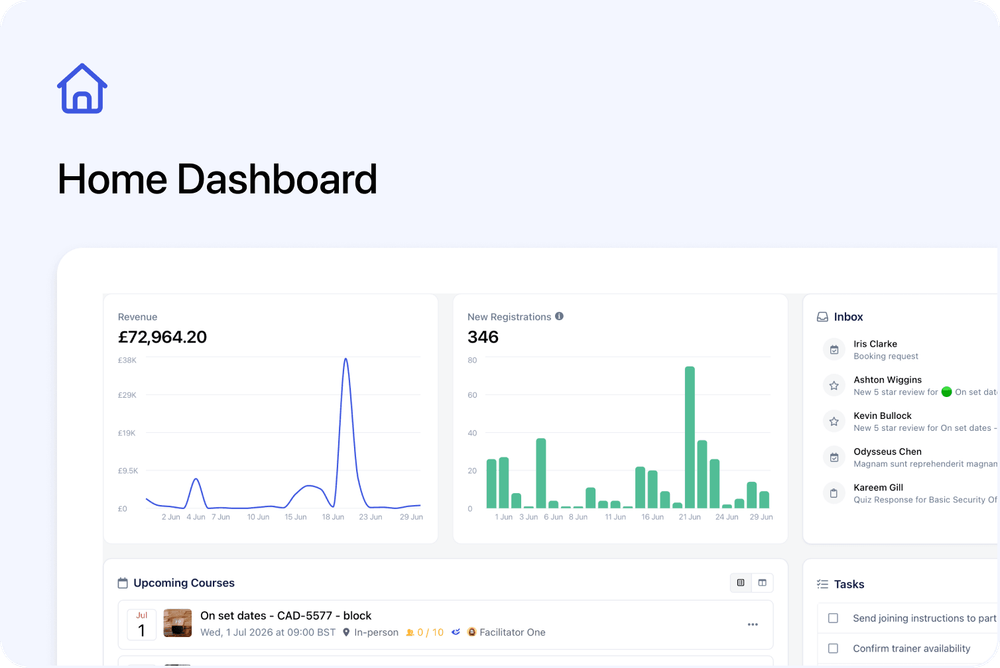
Cademy now has a new Home dashboard that brings key account information and everyday admin work into one place.
Home is now the first page you see after signing in. From here, you can review recent activity, check upcoming course dates, manage Tasks, open conversations, create Orders, and catch up on product updates.
This is the first version of the dashboard, with more improvements planned for this area.
What you can see
The Home dashboard includes cards for:
- Revenue
- New Registrations
- Upcoming Courses
- Tasks
- Orders
- Inbox
- Product Updates
📊 Revenue and New Registrations
These cards show activity from the last 30 days.
Revenue is shown as a chart, while New Registrations shows how many Registrations were created during that period.
The Registration count is based on when the Registration was created, regardless of when the course takes place.
The 30-day period is fixed and cannot currently be changed from Home.
📅 Upcoming Courses
Upcoming Courses has two views:
- List view shows your next upcoming course dates with details such as date, time, location, spaces, and assigned team members.
- Week View shows course dates across the next five days and can display several events on the same day.
✅ Tasks
The Tasks card shows Tasks assigned to you or created by you.
You can create, open, and complete Tasks directly from Home.
🧾 Orders
The Orders card includes two views:
- Recent shows your latest Orders.
- Requires Attention currently shows Orders that are Awaiting Payment or Overdue.
You can also create a new Order directly from the card.
📬 Inbox and Product Updates
The Inbox card shows your most recent conversations. Click a conversation to open it directly in the Inbox.
The Product Updates card shows the latest Cademy product update posts. Click an update to read the full post.
Good to know
The Home dashboard follows your existing role and permissions.
System Admins can see the cards and information available to them across the account. Course Owners and Facilitators only see the areas they are allowed to access.
The new Home dashboard is available on all plans.
This update gives us a foundation to keep improving Home with more useful information and actions over time.
Where to find it
Home opens automatically when you sign in to the Admin dashboard.
You can also open it directly here: