
You can choose whether reviews and star ratings appear publicly across Cademy.
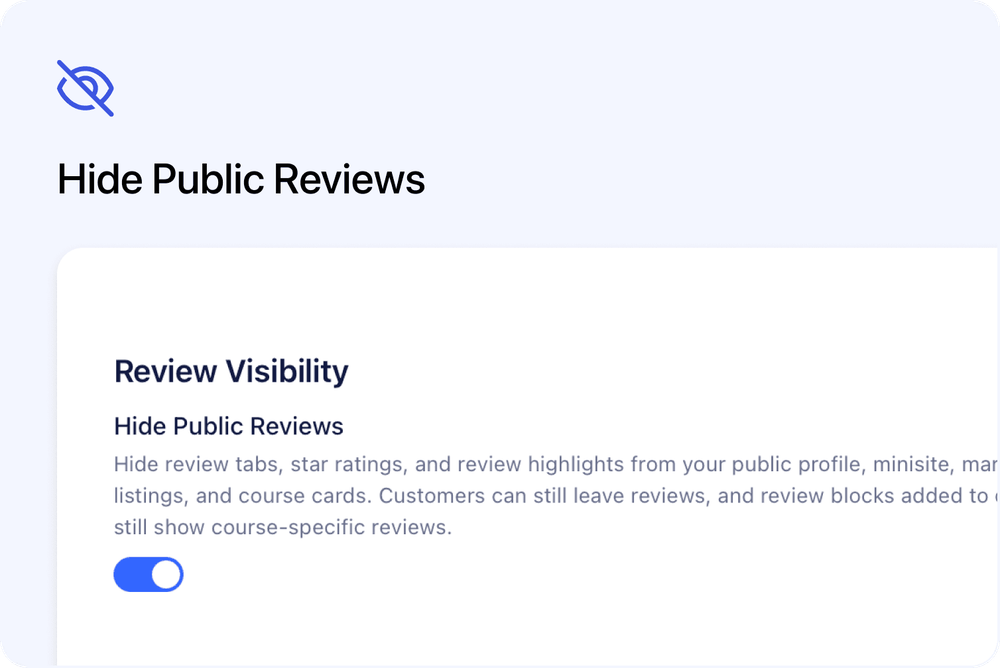
The Hide Public Reviews setting removes review tabs, ratings and review highlights from your public profile, mini-site, marketplace listings, search results and course cards.
Customers can still leave reviews. You can also continue showing reviews on selected course pages by adding a Reviews block to those courses.
What happens when reviews are hidden
When Hide Public Reviews is turned on, Cademy hides:
- The Reviews tab on your public profile
- Your public review page
- The star rating shown below your profile name
- Ratings on course cards
- Ratings on educator cards
- Ratings in public search results
- Ratings in course educator sections
- Review highlights from your public profile
- Reviews shown automatically on older course pages
Your review totals and ratings are also removed from public page data and search results.
Customers can still leave reviews
Hiding public reviews does not stop customers from submitting feedback.
Customers can still:
- Open an educator Add Review page
- Open a course Add Review page
- Submit a new review
Existing and new reviews remain stored in Cademy. They are hidden from public view rather than deleted.
Reviews on course pages
Course reviews depend on how the Reviews section was added to the course page.
Automatic course reviews
Reviews that were added automatically by the older course page layout are hidden when Hide Public Reviews is turned on.
Reviews blocks added to a course
If a course already has a Reviews block added through the course page editor, it can continue showing reviews for that course.
This is treated as a choice to show course-specific reviews.
The Reviews block can still include:
- Reviews for that course
- An Add Review option
It will not show Other Course Reviews from your wider profile while public reviews are hidden.
To stop reviews from appearing on that course, remove the Reviews block from the course page editor.
Existing courses
Existing courses are not changed automatically.
If an existing course already has a Reviews block, it can continue showing course-specific reviews.
This means turning on Hide Public Reviews does not remove Reviews blocks that you have already added to course pages.
New courses
When Hide Public Reviews is turned on, new courses do not include the default Reviews block.
You can still add a Reviews block manually if you want to show reviews on a specific course page.
When public reviews are not hidden, new courses continue using the existing default course page layout.
How to hide public reviews
- Open your Profile page in the Admin dashboard.
- Scroll to the Review Visibility section.
- Turn on Hide Public Reviews.
The setting saves immediately.
Ratings and reviews are then removed from the relevant public pages, cards and search results.
How to show reviews again
- Open your Profile page in the Admin dashboard.
- Find the Review Visibility section.
- Turn off Hide Public Reviews.
Your public review tabs, ratings and review highlights can then appear again.
Good to know
Reviews are not deleted
Turning on Hide Public Reviews does not delete any reviews.
The setting only controls whether reviews and ratings are shown publicly.
Review collection continues
Customers can still leave reviews while public reviews are hidden.
Public review pages are hidden
The public Reviews page for your profile is not available while the setting is turned on.
Ratings are hidden across public areas
Your rating is removed from public profiles, search results, marketplace listings, course cards, educator cards and course educator sections.
Existing course Reviews blocks can remain visible
A Reviews block that has already been added to a course can continue showing reviews for that course.
Remove the block from the course page editor if you do not want those reviews to appear.
Other Course Reviews are not shown
A course Reviews block will not include reviews from your other courses while public profile reviews are hidden.
Frequently asked questions
Does hiding public reviews delete them?
No.
Your reviews remain stored in Cademy. They are only hidden from public view.
Can customers still leave reviews?
Yes.
Customers can still use educator and course Add Review pages to submit feedback.
Will my star rating disappear from my profile?
Yes.
The star rating below your name is hidden from your public profile.
Are ratings also removed from course cards and search results?
Yes.
Ratings are hidden from public search results, course cards, educator cards, profile headers and course educator sections.
What happens to the Reviews tab on my profile?
The Reviews tab and public review page are hidden while Hide Public Reviews is turned on.
What happens to reviews on older course pages?
Reviews that are shown automatically through the older course page layout are hidden.
What happens if a course already has a Reviews block?
The block can continue showing reviews for that course.
This is treated as an intentional choice to show course-specific reviews.
Will the course Reviews block show reviews from my other courses?
No.
Other Course Reviews are not shown while public profile reviews are hidden.
Can customers still add a review from a course Reviews block?
Yes.
Course Reviews blocks can still include the Add Review option.
Will new courses include a Reviews block?
Not while Hide Public Reviews is turned on.
You can still add a Reviews block manually to an individual course.
Are existing courses updated automatically?
No.
Existing courses are not changed automatically. A Reviews block already added to a course can remain visible.
Can I make my reviews public again?
Yes.
Turn off Hide Public Reviews from the Review Visibility section on your Profile page.