
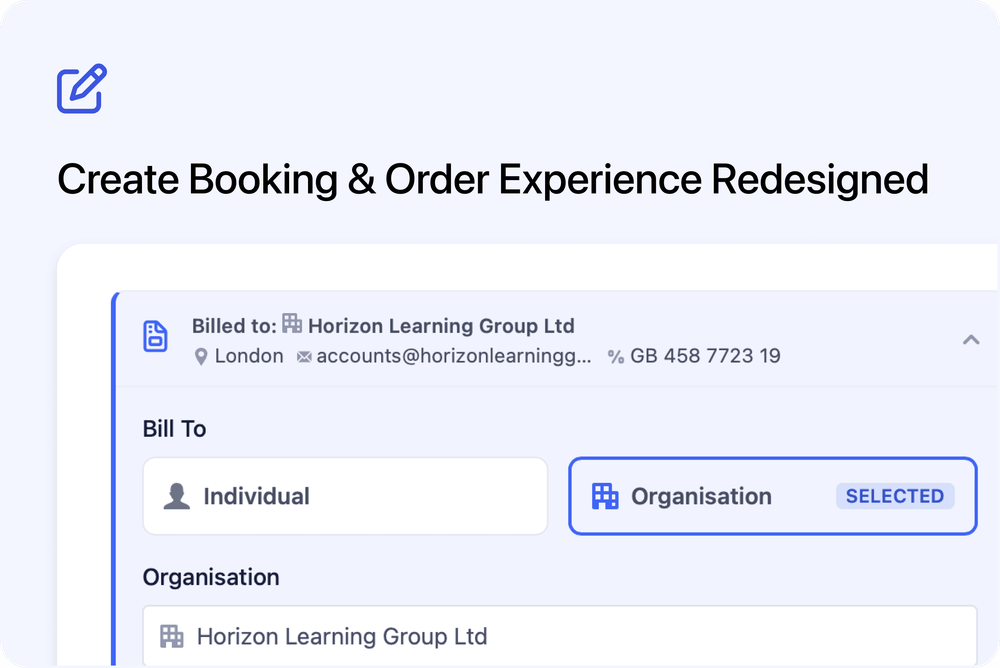
We’ve completely redesigned the Create Booking / Order experience in the Admin dashboard to make it faster, clearer, and more powerful. From smarter contact selection and automatic invoice population to a resizable layout and improved guest management, creating bookings and orders is now significantly more efficient.
What’s new
🖥️ Resizable, wider workspace
The booking and order panel is now resizable.
- Opens at a comfortable default width
- Drag to resize
- Your preferred width is remembered
- Two-column layout automatically appears on wider screens
This makes it easier to review contact, billing, and guest details without excessive scrolling.
⚡ Faster, smarter course selection
The course selector has been improved for performance and clarity.
- Faster loading
- Shows course external reference codes
- Unpublished courses clearly labelled
- Full course names visible on hover
Finding the right course is now quicker and clearer.
👤 Redesigned contact selection
The contact selector has been rebuilt to provide more context at a glance.
- Displays contact name, email, and organisation
- Shows Key Contact and Billing Contact badges
- Contacts with organisation roles are prioritised in search results
- Hover to preview additional details
- Click to open the contact record
- Create new contacts inline with a simplified form
Enrollment-only fields are clearly indicated when enabled.
🏢 Clear Individual vs Organisation booking
You can now explicitly choose whether a booking or order is for:
- Individual
- Organisation
When selecting a contact:
- If they are linked to an organisation, billing mode switches automatically
- The organisation is pre-selected
- Billing details auto-populate
- You can switch modes at any time
If Organisation billing is selected, an organisation must be chosen before submission.
🧾 Smarter invoice details
The invoice section has been redesigned and made more prominent for paid bookings.
- Hidden for free bookings
- Clearly displayed for paid bookings
- Auto-populates from contact or organisation records
- Includes recipient name, billing email, VAT number, PO number, address, due date, and notes
- Due date includes a date picker and clear option
- Completion indicators show when required sections are filled
Switching between Individual and Organisation updates billing details instantly.
👥 Improved guest management
The guest section is now clearer and more flexible.
- Collapsible section
- Context-aware labels (Attendee / Participant)
- Accurate space tracking and unassigned counts
- Large group warning for 30+ participants
- Completion banner when all participants are assigned
- Enrollment fields supported per participant
This makes managing larger bookings significantly easier.
🔎 Better organisation visibility
When booking for an organisation:
- Organisation selector is searchable
- Billing details sync automatically
- Validation prevents submission without a selected organisation
Billing information is included correctly in the final booking or order.
Additional improvements
- Mobile layout optimisations for booking controls
- Improved invoice layout consistency
- UI refinements and styling updates
- Improved guest clearing behaviour
- Full compatibility when viewing and editing existing bookings and orders
These improvements make booking and order creation faster, more accurate, and better aligned with real-world workflows - especially for business and invoice-based bookings.